Nissan Altima (L32) 2007-2012 Service Manual: Differential side oil seal
Exploded View
1. Transaxle assembly
2. Differential side oil seal
Removal and Installation
REMOVAL
1. Remove drive shaft assembly. Refer to FAX-11, "Removal and
Installation (Left Side)" and FAX-12, "Removal and Installation
(Right Side)".
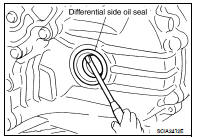
2. Remove the differential side oil seal using suitable tool
CAUTION:
Do not scratch transaxle case or converter housing.
INSTALLATION
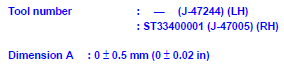
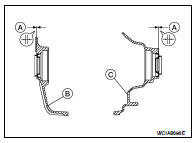
1. Drive the new differential side oil seal into the transaxle case
side (B) and converter housing side (C) until it is flush using
Tools.
CAUTION:
• Do not reuse differential side oil seals.
• Apply specified NISSAN CVT fluid to side oil seals.
2. Install drive shaft assembly. Refer to FAX-11, "Removal and Installation
(Left Side)" and FAX-12,
"Removal and Installation (Right Side)".
3. Check CVT fluid level. Refer to TM-240, "Inspection".
Exploded View
1. Air cleaner
2. Air breather hose
3. Transaxle assembly
4. Heater pipe
5. Clip
A. Paint mark
Removal and Installation
CAUTION:
• Install air breather hose with paint ma ...
TRANSAXLE ASSEMBLY
Exploded View
1. Rear gusset
2. Air breather hose
3. CVT fluid level gauge
4. CVT fluid charging pipe
5. O-ring
6. Copper washer
7. Fluid cooler tube
8. Transaxle assem ...
Other materials: Automatic brake hold (if so equipped)
The automatic brake hold function maintains
the braking force without the driver
having to depress the brake pedal when
the vehicle is stopped at a traffic light or
intersection. As soon as the driver depresses
the accelerator pedal again, the
automatic brake hold function is deactivated
and the bra ...
Tire Pressure Monitoring System
(TPMS)
Each tire, including the spare (if provided),
should be checked monthly when cold and
inflated to the inflation pressure recommended
by the vehicle manufacturer on
the vehicle placard or tire inflation pressure
label. (If your vehicle has tires of a different
size than the size indicated on the vehi ...
Precautions on child restraints
WARNING
Failure to follow the warnings and instructions
for proper use and installation
of child restraints could result in serious
injury or death of a child or other
passengers in a sudden stop or collision:
The child restraint must be used
and installed properly. Always follow
all of ...



 Air breather hose
 Removal and installation