Nissan Altima (L32) 2007-2012 Service Manual: Differential side oil seal
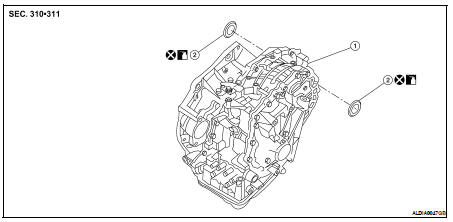
Exploded View
1. CVT assembly
2. Differential side oil seal
Removal and Installation
REMOVAL
1. Remove drive shaft assembly. Refer to FAX-11, "Removal and
Installation (Left Side)" and FAX-12, "Removal and Installation
(Right Side)".
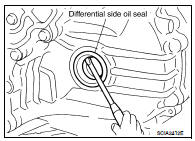
2. Remove the differential side oil seal using suitable tool
CAUTION:
Do not scratch transaxle case or converter housing.
INSTALLATION
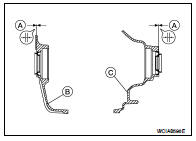
1. Drive the new differential side oil seal into the transaxle case
side (B) and converter housing side (C) until it is flush using
Tool.
Tool number : KV38100300 ( — )
Dimension A : 1.8 ± 0.5 mm (0.071 ± 0.020 in)
CAUTION:
• Do not reuse differential side oil seals.
• Apply specified NISSAN CVT fluid to side oil seals.
2. Install drive shaft assembly. Refer to FAX-11, "Removal and
Installation (Left Side)" and FAX-12, "Removal and Installation (Right Side)".
3. Check CVT fluid level. Refer to TM-416, "Inspection".
Exploded View
1. Control lever
2. Control device assembly
3. Control cable socket
4. Retainer grommet
5. Control cable
6. Bracket
7. Lock plate
8. Manual lever
Removal and Installation
RE ...
Exploded View
1. Air breather hose
2. Clip
3. Bracket
4. Air breather tube
5. CVT assembly
A. Paint mark
Removal and Installation
Refer to the figure for removal and installation.
CAUTIO ...
Other materials: Checking engine oil level
2.0L 4 cylinder (KR20DDET engine
model)
1. Park the vehicle on a level surface and
apply the parking brake.
2. Start the engine and let it idle until it
reaches operating temperature.
3. Turn off the engine. Wait more than 10
minutes for the oil to drain back into
the oil pan.
4. Remove the dips ...
Manual shift mode (if so
equipped)
When the shift lever is in the D (Drive) position
and the drive sport mode switch is
pushed, the transmission is ready for the
manual shift mode. Shift ranges can be
selected manually by pulling the right-side
or left-side paddle shifter.
When shifting up, pull the right side paddle
shifter (+) B. ...
Voice commands
Voice commands can be used to operate
the Bluetooth Hands-Free Phone System.
Press and hold thebutton for less
than 1.5 seconds to bring up the phone
command menu. The commands available
are:
Call <name>
Dial <number>
Recent Calls
Read/Send Text (if so equipped)
Siri (if so equipp ...


 Control cable
 Air breather hose