Nissan Altima (L32) 2007-2012 Service Manual: Front grille
Removal and Installation
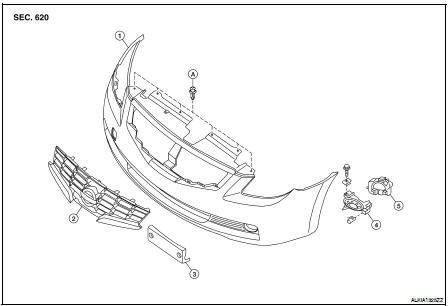
1. Front bumper fascia
2. Front grille
3. License plate bracket
4. Fog lamp finisher (if equipped)
5. Fog lamp (if equipped)
A. Clip C101
Removal
1. Remove the front fender protectors RH and LH. Refer to EXT-19, "Removal
and Installation".
2. Remove the engine under cover.
3. Remove the RH and LH side under covers.
4. Remove the front bumper fascia clips and screws, then remove the front bumper
fascia.
5. Remove the fog lamp if equipped. Refer to EXL-256, "Removal and
Installation".
6. Release the grille tabs from the front bumper fascia and remove the front
grille.
Installation
Installation is in the reverse order of removal.
Removal and Installation
1. Rear bumper side brackets
2. Rear bumper supports
3. Rear bumper reinforcement
4. Rear energy absorbing foam
5. Rear bumper fascia
A. C205 push pin
REMOVAL
1. R ...
Removal and Installation
1. Cowl top seal
2. Cowl top side trim covers
3. Cowl top foam blocks
4. Cowl top
A. Clips
REMOVAL
1. Remove both the RH and LH wiper arms. Refer to WW-116, "FRO ...
Other materials: Precautions on child restraints
WARNING
Failure to follow the warnings and instructions
for proper use and installation
of child restraints could result in serious
injury or death of a child or other
passengers in a sudden stop or collision:
The child restraint must be used
and installed properly. Always follow
all of ...
Settings
The setting mode allows you to change the
information displayed in the vehicle information
display. It also allows you to change
vehicle functions:
VDC
Driver Assistance
Clock
Meter Settings
Vehicle Settings
Maintenance
Alarm
Tire Pressures
Unit
Language
Factory Reset
VDC
The VDC Settin ...
Warning/Indicator lights
Warning/Indicator light (red)
Brake warning
light
Charge warning
light
Electronic parking
brake indicator
light (if so
equipped)
Engine oil pressure
warning light
Master warning
light
Seat belt warning
light and chime
Security indicator
light
Supplemental air
bag warning light
Warning/Indicator
ligh ...

 Rear bumper
 Cowl top