Nissan Altima (L32) 2007-2012 Service Manual: Key slot
Removal and Installation
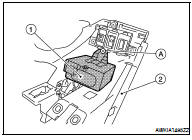
REMOVAL
1. Remove the instrument lower panel LH. Refer to IP-12, "Removal and
Installation".
2. Disconnect key slot connector.
3. Remove the key slot screw (A), and then remove key slot (1)
from instrument lower panel LH (2).
INSTALLATION
Installation is in the reverse order of removal.
Removal and Installation
REMOVAL
1. Remove the cluster lid A assembly. Refer to IP-12, "Removal and
Installation".
2. Release the pawls (A) and remove the push-button ignition
switch ...
Other materials: Intelligent Around View Monitor
(if so equipped)
CAMERA button
WARNING
Failure to follow the warnings and instructions
for the proper use of the Intelligent
Around View Monitor system
could result in serious injury or death
The Intelligent Around View Monitor
is a convenience feature and is not a
substitute for proper vehicle operation
be ...
How to switch the display
With the ignition switch in the ON position,
press the CAMERA button or move the shift
lever to the R (Reverse) position to operate
the Intelligent Around View Monitor.
The Intelligent Around View Monitor displays
different split screen views depending
on the position of the shift lever. Press
the ...
Sun visors
To block glare from the front, swing
down the main sun visor 1.
To block glare from the side, remove the
main sun visor 2 from the center
mount and swing the visor to the side.
To extend the sun visor, slide in or out as
needed 3.
CAUTION
Do not store the sun visor before returning ...

 On-vehicle repair
 Push button ignition switch