Nissan Altima (L32) 2007-2012 Service Manual: License plate lamp
Bulb Replacement
REMOVAL
1. Position trunk lid finisher aside.
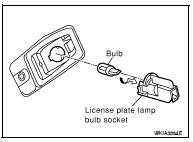
2. Turn license plate lamp bulb socket counterclockwise to unlock
and remove.
3. Pull license plate lamp bulb to remove from socket.
INSTALLATION
Installation is in the reverse order of removal.
Removal and Installation
REMOVAL
1. Remove the license lamp finisher. Refer to EXT-23, "Removal and
Installation".
2. Disconnect the license plate lamp connector.
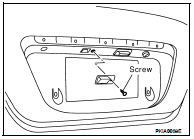
3. Remove the license plate lamp screw and remove the license
plate lamp.
INSTALLATION
Installation is in the reverse order of removal.
Bulb Replacement
Removal
1. Remove the rear combination lamp. Refer to EXL-260, "Removal and
Installation".
2. Turn back-up lamp bulb socket counterclockwise to unlock and remove.
...
Bulb Replacement
Removal
1. Remove the rear combination lamp. Refer to EXL-260, "Removal and
Installation".
2. Turn the rear turn signal lamp bulb socket counterclockwise and remove ...
Other materials: Doors
When the doors are locked using one of the
following methods, the doors cannot be
opened using the inside or outside door
handles. The doors must be unlocked to
open the doors.
WARNING
Always have the doors locked while
driving. Along with the use of seat
belts, this provides greater safety in
...
Radio
Place the ignition switch in the ACC or ON
position and press the PUSHbutton
to turn the radio on. If you listen to the radio
with the engine not running, the ignition
switch should be placed in the ACC
position.
Radio reception is affected by station signal
strength, distance from radio transmitte ...
Interior lights
The interior light can be turned on regardless
of door position. The light will
go off after a period of time unless the
ignition switch is placed in the ON position
when any door is opened.
The interior lights can be set to operate
when the doors are opened. To turn off
the interior light ...

 Back-up lamp
 Rear combination lamp