Nissan Altima (L33) 2013-2018 Owners Manual: Map lights
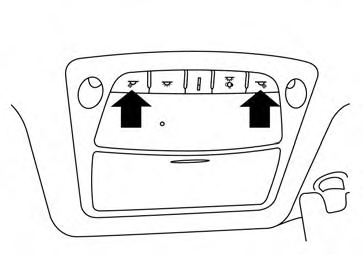
Push the button to turn the map lights on. To turn
them off, press the button again.
CAUTION
Do not use for extended periods of time
with the engine stopped. This could result
in a discharged battery.
Rear personal lights
To turn the rear personal lights on, press the
switch. To turn them off, press the switch again. ...
The light illuminates when the trunk lid is opened.
When the trunk lid is closed, the light goes off.
The light will go off after a period of time if the
trunk lid is left open, unless the igni ...
Other materials: Wireless charger (if so equipped)
Indicator
Charging pad
The wireless charger is located on the front
of the center console. Lay the smartphone
on the pad of the wireless charger. Charging
will start automatically. The smartphone
will be charged continuously while
the ignition switch is in the ON position.
NOTE:
The wireless ch ...
Programming HomeLink for Canadian
customers and gate openers
Canadian radio-frequency laws require
transmitter signals to "time-out" (or quit)
after several seconds of transmission -
which may not be long enough for
HomeLink to pick up the signal during
training. Similar to this Canadian law, some
U.S. gate operators are designed to "timeout"
in the same mann ...
Resetting the drive computer
The drive computer is divided across three
screens:
Speed
Trip Distance & Time
Fuel Economy
1. Press the or
buttons until the
desired drive computer screen is
displayed.
2. Press the OK button to bring up the drive
computer Reset menu.
3. Use the or
to select the desired
option. Then press ...

 Personal Lights
 Trunk light