Nissan Altima (L32) 2007-2012 Service Manual: Mode door motor
Removal and Installation
REMOVAL
1. Remove the combination meter. Refer to MWI-176, "Removal and
Installation".
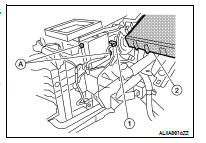
2. Remove the BCM (2). Refer to BCS-96, "Removal and Installation".
NOTE:
The illustration is shown with the heater and cooling unit assembly
out of the vehicle for clarity.
3. Disconnect the mode door motor connector (1).
4. Remove the mode door motor screws (A) and then remove the
mode door motor.
INSTALLATION
Installation is in the reverse order of removal.
Removal and Installation
REMOVAL
1. Remove the instrument panel assembly. Refer to VTL-14, "Removal and
Installation".
2. Disconnect the intake door motor connector (1).
3. Remove ...
Removal and Installation
AIR MIX DOOR MOTOR - LH
Removal
1. Remove the instrument lower cover LH. Refer to IP-12, "Removal and
Installation".
2. Remove the center console side finis ...
Other materials: Emergency call (SOS) button (if so equipped)
Emergency support
NissanConnect Services provide various
services to support dealing with emergencies
of the subscribed vehicle and the
driver.
For example, in case of an illness or serious
injury, you can seek support by pressing
the in-vehicle Emergency Call (SOS) button
and connecting to the Nis ...
Rear Door Alert
The Rear Door Alert system functions under
certain conditions to indicate there
may be an object or passenger in the rear
seat(s). Check the seat(s) before exiting the
vehicle.
The Rear Door Alert system is initially disabled.
The driver can enable the system
using the vehicle information display. ...
RearView Monitor system operation
With the ignition switch in the ON position,
move the shift lever to the R (Reverse) position
to operate the RearView Monitor.
How to read the displayed lines
Guiding lines which indicate the vehicle
width and distances to objects with reference
to the vehicle body line A are displayed
on the monit ...
 Intake door motor
 Air mix door motor