Nissan Altima (L32) 2007-2012 Service Manual: Rear seat
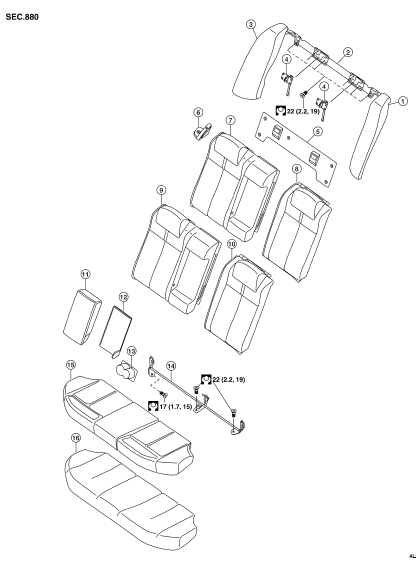
Exploded View
BENCH SEAT
1. Rear seat side bolster assembly LH
2. Rear seatback latch mount
3. Rear seat side bolster assembly RH
sunwin 4. Rear seatback latch
5. Rear seatback trim panel
6. Seat belt guide
7. Rear seatback pad RH
8. Rear seatback pad LH
9. Rear seatback pad trim RH
10. Rear seatback pad trim LH
11. Armrest
12. Armrest trim panel
13. Cup holder
14. Rear seatback hinge assembly
15. Rear seat cushion trim
16. Rear seat cushion
Removal and Installation
REMOVAL
1. Remove the rear seat cushion trim and pad.
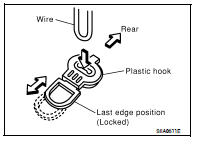
• Pull the lock at the front bottom of the seat cushion forward
(one for each side), and pull the seat cushion upward to
release the wire from the plastic hook, then pull the seat cushion
forward to remove.
2. Remove the seat belt webbing from the guides.
3. Fold seatbacks forward.
4. Remove upper seatback trim panel.
5. Remove rear side bolster bolts.
6. Lock seatbacks in upright position.
7. Remove the seatback hinge anchor bolts and nut.
8. Remove the seatback assembly.
INSTALLATION
Installation is in the reverse order of removal.
Exploded View
DRIVER'S SEAT
1. Headrest
2. Headrest holder (locked)
3. Headrest holder (free)
4. Seatback board
5. Seatback assembly
6. Slide cover
7. Seat belt buckle
8. Seat harness
9. ...
Other materials: FM/AM radio
Display screen
PUSH SOUND button / TUNE-SCROLL
knob
BACK button
MENU button
AUDIO button
(SEEK/TRACK) buttons
VOL (volume) knob / PUSH
(power)
button
For additional information, see "Audio operation
precautions" regarding all
operation precautions in this section.
Audio main op ...
Trip computer
1. Vehicle speed
The vehicle speed mode shows the current
vehicle speed and the average vehicle
speed since the last reset.
Average vehicle speed:
Press the OK button on the steering wheel
to bring up the drive computer Reset
menu, and follow the instructions to reset.
For additional information, ...
Controls
Fan speed control dial
The fan speed control dial turns
the
fan on and off and controls fan speed.
Air flow control buttons
The air flow control buttons allow you to
select the air flow outlets.
- Air flows from center and side
vents.
- Air flows from center and side
vents and foot outlets.
- Air ...

 Front seat
 Disassembly and assembly