Nissan Altima (L33) 2013-2018 Owners Manual: Troubleshooting guide
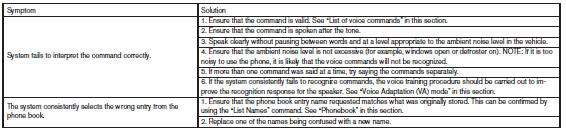
The system should respond correctly to all voice
commands without difficulty. If problems are encountered,
try the following solutions.
Where the solutions are listed by number, try
each solution in turn, starting with number 1, until
the problem is resolved.
While using the Voice Recognition system, it is
possible to select menu options by using the
steering wheel controls instead of speaking voice
commands. The manual control mode does not
allow dial ...
WARNING
● Use a phone after stopping your vehicle
in a safe location. If you have to use a
phone while driving, exercise extreme
caution at all times so full attention may
be given to vehic ...
Other materials: Air conditioner operation
Start the engine, turn thefan
speed
control dial to the desired position, and
press thebutton to activate the air
conditioner. When the air conditioner is on,
cooling and dehumidifying functions are
added to the heater operation.
The air conditioner cooling function operates
only when the engine i ...
USB/iPod charging ports (if so equipped)
Front (Type A) (if so equipped)
Front (Type B) (if so equipped)
Front (Type C) (if so equipped)
Rear (if so equipped)
Type-C USB
Type-A USB
There are USB charging ports located in
the rear seat area on the back of the center
console. These ports will charge compatible
devices.
NOTE:
Not al ...
LED Daytime Running Lights (DRL)
system
The LED DRL automatically illuminate at
100% intensity when the engine is started
and the parking brake released. The LED
Daytime Running Lights (DRL) operate with
the headlight switch in any position. When
you turn the headlight switch to the
position for full illumination, the LED DRL
illuminate ...

 Manual control
 Bluetooth® Hands-Free Phone System without Navigation System (Type B) (if so
equipped
Bluetooth® Hands-Free Phone System without Navigation System (Type B) (if so
equipped