Nissan Altima (L32) 2007-2012 Service Manual: Engine coolant temperature gauge
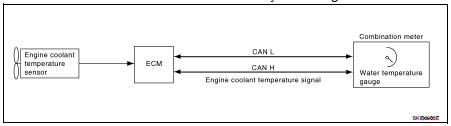
System Diagram
System Description
The engine coolant temperature gauge indicates the engine coolant
temperature.
The ECM provides an engine coolant temperature signal to the combination meter
via CAN communication
lines.
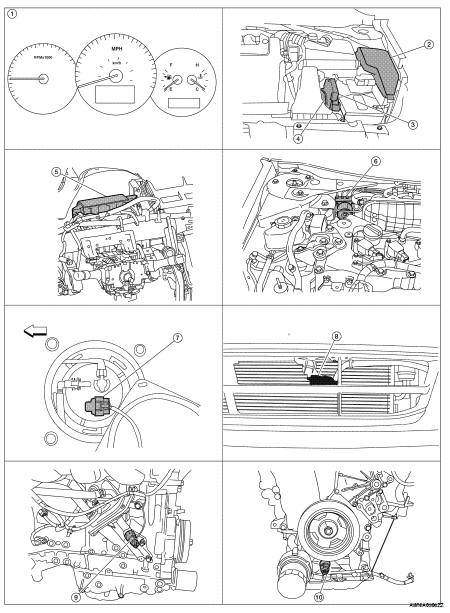
Component Parts Location
1. Combination meter M24
2. IPDM E/R E17, E18, E201, F10
3. ECM E10
4. TCM F16
5. BCM M17, M18, M19, M21 (view with
instrument panel removed)
6. ABS actuator and electric unit (control
unit) E26
7. Fuel level sensor unit and fuel pump
(fuel level sensor) B42 (view with rear
seat and inspection hole cover removed)
8. Ambient sensor E211 (view of front
bumper fascia)
9. Oil pressure switch F41 (QR25DE)
(view with engine removed)
10. Oil pressure switch F41 (VQ35DE)
(view with engine removed)
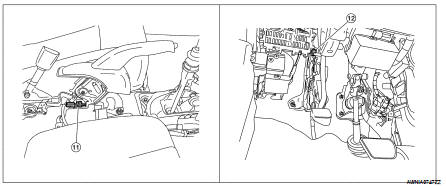
11. Parking brake switch M73
(Sedan with M/T and Coupe)
(view with center console removed)
12. Parking brake switch E35
(Sedan with CVT)
(view with instrument lower cover LH
removed)
Component Description
System Diagram
System Description
The tachometer indicates engine speed in revolutions per minute (rpm).
The ECM provides an engine speed signal to the combination meter via CAN
commu ...
System Diagram
System Description
The fuel gauge indicates the approximate fuel level in the fuel tank.
The fuel gauge is regulated by the unified meter control unit and a variable
resistor s ...
Other materials: Vehicle information display warnings
and indicators
The following messages may appear in
your vehicle information display.
Place the key near the start
switch
This indicator appears when the battery of
the Intelligent Key is low and when the Intelligent
Key system and the vehicle are not
communicating normally.
If this appears, touch the ignition s ...
Fuel gauge
The gauge indicates the approximate fuel
level in the tank.
The gauge may move slightly during braking,
turning, acceleration, or going up or
down hills.
The gauge needle returns to 0 (Empty) after
the ignition switch is placed in the OFF
position.
The low fuel warning message shows in
the vehic ...
FM/AM radio
Display screen
PUSH SOUND button / TUNE-SCROLL
knob
BACK button
MENU button
AUDIO button
(SEEK/TRACK) buttons
VOL (volume) knob / PUSH
(power)
button
For additional information, see "Audio operation
precautions" regarding all
operation precautions in this section.
Audio main op ...


 Tachometer
 Fuel gauge