Nissan Altima (L32) 2007-2012 Service Manual: Drive belts
Checking Drive Belts
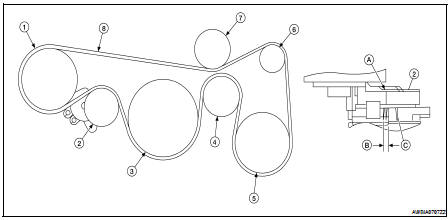
1. Power steering pump
2. Drive belt auto-tensioner
3. Crankshaft
4. Idler pulley
https://gorvulikent.top/ 5. A/C compressor pulley
6. Generator pulley
7. Idler pulley
8. Drive belt
A. Indicator
B. Possible use range (for new belt)
C. Belt replacement
WARNING:
Inspect and check the drive belts with the engine off.
1. Inspect belt for cracks, fraying, wear or oil adhesion. If necessary,
replace with a new one.
2. Rotate the crankshaft pulley two times then check the belt tension.
NOTE:
• Inspect drive belt tension when engine is cold.
Tension Adjustment
• Belt tension is not manually adjustable, it is automatically adjusted by
the drive belt auto-tensioner.
Changing Engine Coolant
WARNING:
• To avoid being scalded, never change the coolant when the engine is hot.
• Wrap a thick cloth around cap and carefully remove the cap. First, turn the
cap ...
Other materials: Fuel gauge
The gauge indicates the approximate fuel
level in the tank.
The gauge may move slightly during braking,
turning, acceleration, or going up or
down hills.
The gauge needle returns to 0 (Empty) after
the ignition switch is placed in the OFF
position.
The low fuel warning message shows in
the vehic ...
Warning lights, indicator lights and audible
reminders
Warning/Indicator light (red)
Brake warning light
Charge warning light
Electronic parking brake
indicator
light (if so equipped)
Engine oil pressure warning
light
Master warning light
Seat belt warning light and
chime
Security indicator light
Supplemental air bag warning
light
Warning/Indic ...
Heated seat switches (if so equipped)
WARNING
Do not use or allow occupants to use
the seat heater if you or the occupants
cannot monitor elevated seat temperatures
or have an inability to feel
pain in body parts that contact the
seat. Use of the seat heater by such
people could result in serious injury.
CAUTION
The battery could run ...

 Engine maintenance (VQ35DE)
 Engine coolant