Nissan Altima (L32) 2007-2012 Service Manual: Headlamp
CONSULT-III Function
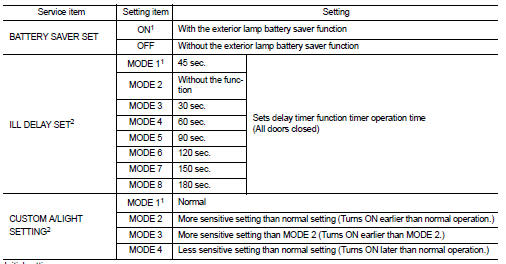
WORK SUPPORT
1 : Initial setting
2: With auto light system
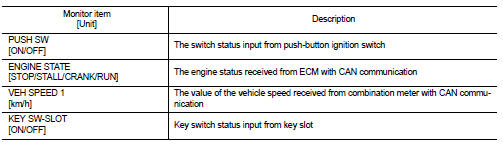
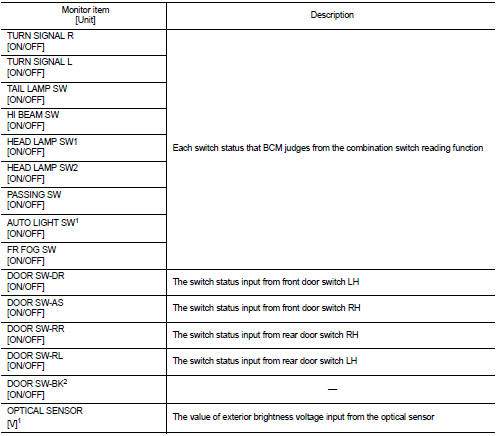
DATA MONITOR
1: With auto light system.
2: The item is indicated, not monitored.
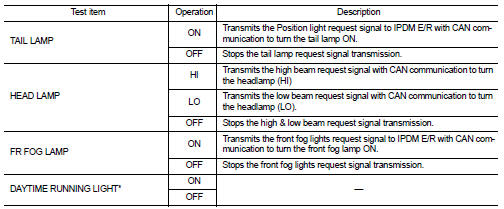
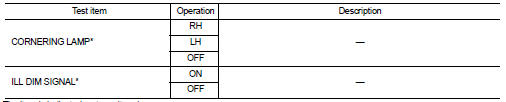
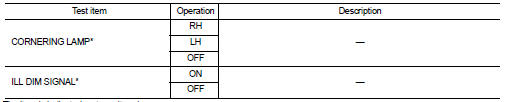
ACTIVE TEST
Diagnosis Description
BCM CONSULT-III FUNCTION
CONSULT-III performs the following functions via CAN communication with BCM.
SYSTEM APPLICATION
BCM can perform the following functions for each sy ...
CONSULT-III Function
Work support
* : Initial setting
Data monitor
Active test
...
Other materials: Programming HomeLink for Canadian
customers and gate openers
Canadian radio-frequency laws require
transmitter signals to "time-out" (or quit)
after several seconds of transmission -
which may not be long enough for
HomeLink to pick up the signal during
training. Similar to this Canadian law, some
U.S. gate operators are designed to "timeout"
in the same mann ...
Engine compartment check locations
2.0L 4 cylinder (KR20DDET engine model)
Engine coolant reservoir
Drive belt location
Engine oil filler cap
Brake fluid reservoir
Battery
Fuse/Fusible link box
Air cleaner
Radiator cap
Engine oil dipstick
Windshield-washer fluid reservoir
Refer to the page number indicated in
parenth ...
NISSAN Vehicle Immobilizer System
The NISSAN Vehicle Immobilizer System
will not allow the engine to start without
the use of a registered key.
If the engine fails to start using a registered
key (for example, when interference is
caused by another registered key, an automated
toll road device or automatic payment
device on the key ...

 Common ITEM
 Flasher