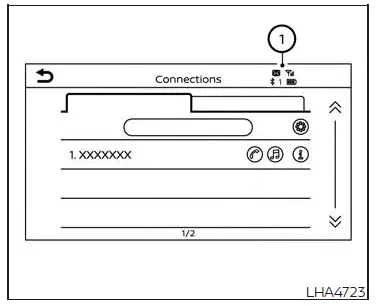
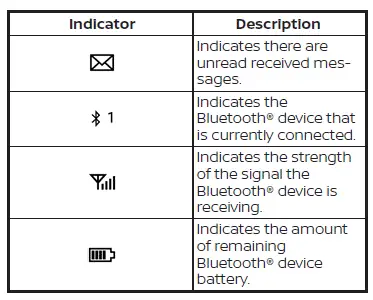
When a cellular phone is connected
through the Bluetooth wireless connection,
indicators 1 for the phone and text
messaging are displayed on the top of the
screen.
Control buttons
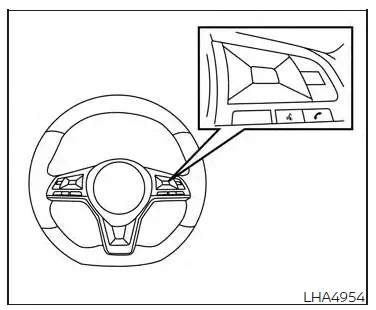
The control buttons for the Bluetooth
Hands-Free Phone System are located on
the steering wheel.
VOICE COMMAND BUTTON
Press and hold thebutton
for more than 1.5 seconds to initiate
the Voice Recognition session.
To exit the Voice Recognition session
press and hold thefor
more than 1.5 seconds. For additional
information, see "Voice
prompt interrupt".
You can use thebutton to
interrupt the system feedback
and give a command at once.
If an iPhone is connected, Siri
can be accessed by pressing the
button for less than 1.5 seconds.
For additional information,
see "Siri Eyes Free".
PHONE BUTTON
To answer an incoming call or to
end a call press thebutton.
FCC Regulatory information
CAUTION: To maintain compliance with
FCC’s RF exposure guidelines, use only
the supplied antenna. Unauthorized antenna,
modification, or attachments
could damage the ...
NOTE:
The connecting procedure must be performed
when the vehicle is stationary. If
the vehicle starts moving during the procedure,
the procedure will be canceled.
To connect a phone to the Bluetooth ...

 VOICE COMMAND BUTTON
 button
for more than 1.5 seconds to initiate
the Voice Recognition session.
button
for more than 1.5 seconds to initiate
the Voice Recognition session. for
more than 1.5 seconds. For additional
information, see "Voice
prompt interrupt".
for
more than 1.5 seconds. For additional
information, see "Voice
prompt interrupt". button to
interrupt the system feedback
and give a command at once.
button to
interrupt the system feedback
and give a command at once. button for less than 1.5 seconds.
 PHONE BUTTON
 button.
 button.
 Regulatory information
 Bluetooth connecting procedure