Nissan Altima (L33) 2013-2018 Owners Manual: Installing top tether strap
First, secure the child restraint with the LATCH
lower anchors (rear outboard seat positions only)
or the seat belt, as applicable.
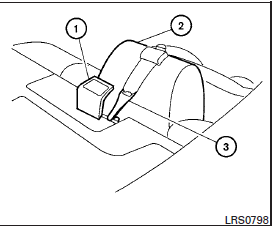
1. Flip up the anchor cover 1 from the anchor
point which is located directly behind the
child seat.
2. Position the top tether strap over the top of
the head restraint/headrest 2 .
3. Secure the tether strap to the tether anchor
point on the rear parcel shelf 3 .
4. Refer to the appropriate child restraint installation
procedure steps in this section
before tightening the tether strap.
If you have any questions when installing a
top tether strap, consult your NISSAN
dealer for details.
WARNING
The three-point seat belt with Automatic
Locking Retractor (ALR) must be used
when installing a child restraint. Failure to
use the ALR mode will result in the child
restraint not being p ...
Precautions on booster seats
WARNING
If a booster seat and seat belt are not used
properly, the risk of a child being injured in
a sudden stop or collision greatly
increases:
– Make sure the s ...
Other materials: Supplemental air bag warning labels
Warning labels about the supplemental
front-impact air bag system are placed in
the vehicle as shown in the illustration.
WARNING
Do not use a rear-facing child restraint
on a seat protected by an air bag in
front of it. If the air bag deploys, it may
cause serious injury or death.
Supplemental air ...
Power outlet
Instrument Panel
The power outlet is for powering electrical
accessories such as cellular telephones.
It is rated at 12 volt, 120W (10A) maximum.
The power outlet is powered only when the
ignition switch is in the AUTO ACC or ON
position.
CAUTION
The outlet and plug may be hot during
or immedi ...
Automatic operation
Cooling and/or dehumidified
heating (AUTO)
This mode may be used all year round as
the system automatically works to keep a
constant temperature. Air flow distribution,
air intake control, and fan speed are also
controlled automatically.
1. Press the AUTO button on.
2. Turn the temperature control ...

 Forward-facing child restraint installation using the seat belts
 Booster seats