Nissan Altima (L32) 2007-2012 Service Manual: Microphone
Diagnosis Procedure
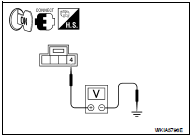
1.CHECK POWER SUPPLY CIRCUIT (MICROPHONE SIDE)
Check voltage between microphone harness connector and ground.
Is proper voltage present?
YES >> GO TO 4
NO >> GO TO 2
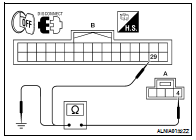
2.CHECK POWER SUPPLY CIRCUIT (CONTINUITY)
1. Turn ignition switch OFF.
2. Disconnect Bluetooth control unit and microphone connectors.
3. Check continuity between microphone harness connector R7
(A) terminal 4 and Bluetooth control unit harness connector
B126 (B) terminal 29.
4. Check continuity between microphone harness connector R7
(A) terminal 4 and ground.
Are continuity results as specified?
YES >> GO TO 3
NO >> Repair harness or connector.
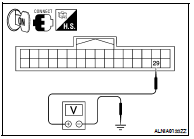
3.CHECK POWER SUPPLY CIRCUIT (BLUETOOTH CONTROL UNIT SIDE)
1. Connect Bluetooth control unit connector.
2. Turn ignition switch ON.
3. Check voltage between Bluetooth control unit harness connector
and ground.
Is proper voltage present?
YES >> Inspection End.
NO >> Replace Bluetooth control unit. Refer to AV-235,
"Removal and Installation - Sedan".
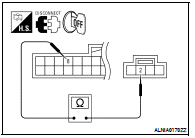
4.CHECK GROUND CIRCUIT
1. Turn ignition switch OFF.
2. Disconnect Bluetooth control unit and microphone connectors.
3. Check continuity between microphone harness connector R7
terminal 2 and Bluetooth control unit harness connector B126
terminal 8.
Is continuity present?
YES >> Inspection End.
NO >> Repair harness or connector.
Diagnosis Procedure
1.CHECK FUSE
Check that the following fuses of the Bluetooth control unit are not blown.
Are the fuses OK?
YES >> GO TO 2
NO >> Be sure to eliminate cause ...
Description
The audio unit sends audio signals to the BOSE speaker amp. The BOSE speaker
amp. amplifies the audio
signals before sending them to the door speakers using the audio signal
circuit ...
Other materials: ProPILOT Assist (if so equipped)
WARNING
Failure to follow the warnings and instructions
for proper use of the ProPILOT
Assist system could result in serious
injury or death.
ProPILOT Assist is not a self-driving
system. Within the limits of its capabilities,
as described in this manual, it
helps the driver with certain drivin ...
Making a call
1. Press thebutton on the Launch
Bar.
The "Phone" screen will appear on the
display.
2. Select one of the options to make a call.
Phonebook
To access the phonebook:
1. Press thebutton on the
steering
wheel or touch the "" key on the
launch bar.
2. Touch the "Phonebook" key.
3. Choose the desir ...
LED Daytime Running Lights (DRL)
system
The LED DRL automatically illuminate at
100% intensity when the engine is started
and the parking brake released. The LED
Daytime Running Lights (DRL) operate with
the headlight switch in any position. When
you turn the headlight switch to the
position for full illumination, the LED DRL
illuminate ...






 Bluetooth control unit
 Door speaker (coupe)