Nissan Altima (L32) 2007-2012 Service Manual: Oil filter
Removal and Installation
REMOVAL
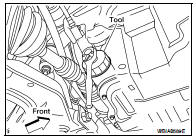
1. Remove the oil filter using Tool.
Tool number : KV10115801 (J-38956)
WARNING:
• Be careful not to get burned, the engine and engine oil
may be hot.
CAUTION:
• When removing, prepare a shop cloth to absorb any oil
leakage or spillage.
• Do not allow engine oil to adhere to the drive belts.
• Completely wipe off any oil that adheres to the engine and
the vehicle.
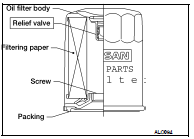
• The oil filter has a built in pressure relief valve. Use a genuine
NISSAN oil filter or equivalent
INSTALLATION
1. Remove foreign materials adhering to the oil filter installation surface.
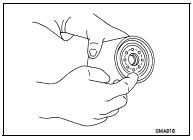
2. Apply clean engine oil to the oil seal contact surface of the new
oil filter.
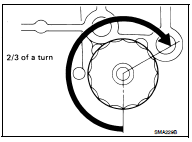
3. Screw the oil filter manually until it touches the installation surface,
then tighten it by 2/3 turn. Or tighten to specification below.
Oil filter : 18.0 N·m (1.8 kg-m, 13 ft-lb)
4. Check oil level and add engine oil as necessary. Refer to LU-9.
5. After warming up the engine, check for any engine oil leaks.
Inspection
OIL LEVEL
• Before starting the engine, check the oil level. If the engine is
already started, stop it and allow 10 minutes before checking.
• Check that the oil level is within ...
Other materials: How to park with predicted course
lines
WARNING
If the tires are replaced with different
sized tires, the predicted course lines
may be displayed incorrectly.
On a snow-covered or slippery road,
there may be a difference between
the predicted course line and the actual
course line.
If the battery is disconnected or becomes
disch ...
Outside mirrors
The outside mirror remote control only operates
when the ignition switch is placed in
the ON position.
Move the small switch 1 to select the right
or left mirror. Adjust each mirror to the desired
position using the large switch 2.
Move the small switch 1 to the center
(neutral) position to preve ...
Headlight control switch
Type A (if so equipped)
Lighting
Rotate the switch to the
position,
and the front parking, tail, license plate,
and instrument panel lights will come
on. The will illuminate in the
meter.
Rotate the switch to the
position,
and the headlights will come on and all
the other lights re ...

 Engine oil
 On-vehicle repair