Nissan Altima (L32) 2007-2012 Service Manual: On-vehicle maintenance
IN-CABIN MICROFILTER
Removal and Installation
REMOVAL
1. Remove the glove box assembly. Refer to IP-12, "Removal and Installation".
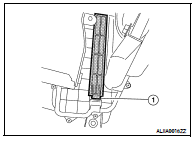
2. Disengage the filter cover tab (1) to remove the filter cover.
3. Remove the in-cabin microfilter from the blower unit by using the
pull tab on the bottom of the filter.
INSTALLATION
Installation is in the reverse order of removal.
IN-CABIN MICROFILTER
Description
FUNCTION
The fresh air (A) and the recirculated air (B) drawn inside the passenger
compartment by the blower fan (1) is kept clean (C) on either
mode by the air ...
Other materials: Tire Pressure Monitoring System
(TPMS)
Each tire, including the spare (if provided),
should be checked monthly when cold and
inflated to the inflation pressure recommended
by the vehicle manufacturer on
the vehicle placard or tire inflation pressure
label. (If your vehicle has tires of a different
size than the size indicated on the vehi ...
Oil control system (if so equipped)
The oil control system can be accessed in
the Maintenance portion of the vehicle information
display settings.
Engine oil information informs the distance
to oil change. Never exceed one year or
7,500 miles (12000 km) between oil change
intervals for the 2.0L 4 cylinder (KR20DDET
engine model) or 1 ...
Operating range
The Intelligent Key functions can only be
used when the Intelligent Key is within the
specified operating range from the request
switch (if so equipped) 1.
When the Intelligent Key battery is discharged
or strong radio waves are present
near the operating location, the Intelligent
Key system’s op ...

 Function diagnosis
 On-vehicle repair