Nissan Altima (L32) 2007-2012 Service Manual: On-vehicle repair
EVAP CANISTER
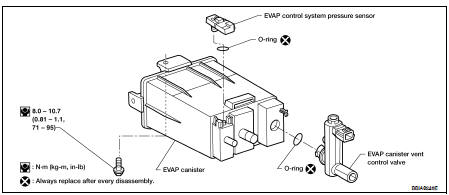
Exploded View
Removal and Installation
REMOVAL
1. Lift up the vehicle.
2. Remove EVAP canister fixing bolt.
3. Remove EVAP canister.
NOTE:
The EVAP canister vent control valve and EVAP canister system pressure sensor
can be removed without
removing the EVAP canister.
INSTALLATION
Install in the reverse order of removal.
NOTE:
Tighten EVAP canister fixing bolt to the specified torque.
DISASSEMBLY
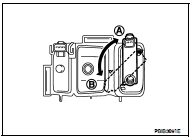
1. Turn EVAP canister vent control valve counterclockwise.
A : Lock
B : Unlock
2. Remove the EVAP canister vent control valve.
ASSEMBLY
Assemble in the reverse order of disassembly.
CAUTION:
Always replace O-ring with a new one.
Inspection
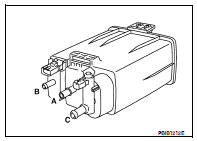
Check EVAP canister as follows:
1. Block port (B).
2. Blow air into port (A) and check that it flows freely out of port (C).
3. Release blocked port (B).
4. Apply vacuum pressure to port (B) and check that vacuum pressure
exists at the ports (A) and (C).
5. Block port (A) and (B).
6. Apply pressure to port (C) and check that there is no leakage.
Inspection
CAUTION:
• Do not use compressed air or a high pressure pump.
• Do not exceed 4.12 kPa (0.042 kg/cm2, 0.6 psi) of pressure in EVAP system.
NOTE:
• Do not start engine.
• I ...
Idle Speed
*: Under the following conditions
• A/C switch: OFF
• Electric load: OFF (Lights, heater fan & rear window defogger)
• Steering wheel: Kept in straight-ahead position
Igni ...
Other materials: Speedometer and odometer
This vehicle is equipped with a speedometer
and odometer. The speedometer is
located on the right side of the meter
cluster. The odometer is located within the
vehicle information display.
5 inch (13 cm) Type A (if so equipped)
Speedometer
The speedometer indicates vehicle speed.
7 inch (18 cm) Ty ...
Interior trunk lid release
WARNING
Closely supervise children when they
are around cars to prevent them from
playing and becoming locked in the
trunk where they could be seriously injured.
Keep the car locked, with the rear
seatback and trunk lid securely latched
when not in use, and prevent children's
access to car keys.
T ...
Precautions on child restraints
WARNING
Failure to follow the warnings and instructions
for proper use and installation
of child restraints could result in serious
injury or death of a child or other
passengers in a sudden stop or collision:
The child restraint must be used
and installed properly. Always follow
all of ...

 Evap leak check
 Service data and specifications
(SDS)
Service data and specifications
(SDS)