Nissan Altima (L32) 2007-2012 Service Manual: On-vehicle repair
EVAP CANISTER
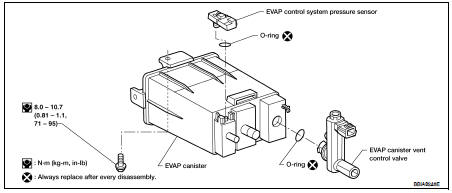
Exploded View
Removal and Installation
REMOVAL
1. Lift up the vehicle.
2. Remove EVAP canister fixing bolt.
3. Remove EVAP canister.
NOTE:
The EVAP canister vent control valve and EVAP canister system pressure sensor
can be removed without
removing the EVAP canister.
INSTALLATION
Install in the reverse order of removal.
NOTE:
Tighten EVAP canister fixing bolt to the specified torque.
DISASSEMBLY
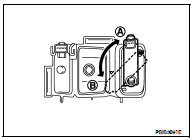
1. Turn EVAP canister vent control valve counterclockwise.
A : Lock
B : Unlock
2. Remove the EVAP canister vent control valve.
ASSEMBLY
Assemble in the reverse order of disassembly.
CAUTION:
Always replace O-ring with a new one.
Inspection
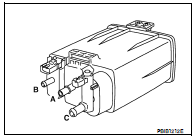
Check EVAP canister as follows:
1. Block port (B).
2. Blow air into port (A) and check that it flows freely out of port (C).
3. Release blocked port (B).
4. Apply vacuum pressure to port (B) and check that vacuum pressure
exists at the ports (A) and (C).
5. Block port (A) and (B).
6. Apply pressure to port (C) and check that there is no leakage.
Inspection
CAUTION:
• Do not use compressed air or a high pressure pump.
• Do not exceed 4.12 kPa (0.042 kg/cm2, 0.6 psi) of pressure in EVAP system.
NOTE:
• Do not start engine.
• ...
Idle Speed
*: Under the following conditions
• A/C switch: OFF
• Electric load: OFF (Lights, heater fan & rear window defogger)
• Steering wheel: Kept in straight-ahead position
Igni ...
Other materials: Bluetooth Hands-Free Phone System
WARNING
Use a phone after stopping your vehicle
in a safe location. If you have to
use a phone while driving, exercise
extreme caution at all times so full
attention may be given to vehicle
operation.
If you are unable to devote full attention
to vehicle operation while talking
on the phon ...
Continuously Variable Transmission
(CVT)
WARNING
Do not depress the accelerator pedal
while shifting from P (Park) or N (Neutral)
to R (Reverse), D (Drive), L (Low) or
manual shift mode (if so equipped).
Always depress the brake pedal until
shifting is completed. Failure to do so
could cause you to lose control and
have an acciden ...
Programming HomeLink
If you have any questions or are having
difficulty programming your HomeLink
buttons, refer to the HomeLink website at:
www.homelink.com or call 1-800-355-3515.
NOTE:
Place the ignition switch in the ON position
(without starting the engine) when
programming HomeLink. It is also recommended that
ane ...

 Evap leak check
 Service data and specifications
(SDS)
Service data and specifications
(SDS)