Nissan Altima (L32) 2007-2012 Service Manual: Rear door speaker
Removal and Installation - Sedan
REMOVAL
1. Remove the rear door finisher. Refer to INT-34, "Removal and
Installation".
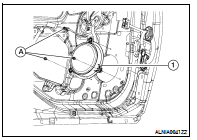
2. Remove the rear door speaker screws (A), then disconnect the
rear door speaker connector and remove the rear door speaker
(1).
INSTALLATION
Installation is in the reverse order of removal.
Removal and Installation
REMOVAL
1. Remove the front door finisher. Refer to INT-12, "Removal and
Installation" (coupe) and INT-34, "Removal
and Installation" (sedan).
2. R ...
Removal and Installation - Coupe
REMOVAL
1. Remove the rear parcel shelf finisher. Refer to INT-17, "Removal and
Installation".
2. Remove the rear tweeter speaker screws (A) and remov ...
Other materials: Steering wheel
WARNING
Do not adjust the steering wheel while
driving. You could lose control of your
vehicle and cause an accident.
Do not adjust the steering wheel any
closer to you than is necessary for
proper steering operation and comfort.
The driver's air bag inflates with
great force. If you are un ...
Rear Cross Traffic Alert (RCTA)
WARNING
Failure to follow the warnings and instructions
for proper use of the RCTA
could result in serious injury or death.
The RCTA system is not a replacement
for proper driving procedures
and is not designed to prevent contact
with vehicles or objects. When
backing out of a parking space, a ...
Remote Engine Start
The button will be on the NISSAN
Intelligent Key if the vehicle has Remote
Engine Start. This feature allows the engine
to start from outside the vehicle.
The following features may be affected
when Remote Engine Start is used:
Vehicles with a manual climate control
system (if so equipped )will ...

 Front door speaker
 Rear tweeter