Nissan Altima (L32) 2007-2012 Service Manual: Rear parcel shelf finisher
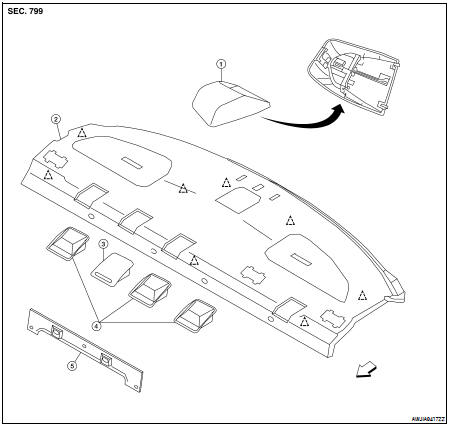
Exploded View
1. High mounted stop lamp
2. Rear parcel shelf finisher
3. Seatback release cover
4. Child anchor cover
5. Seatback latch cover
Removal and Installation
REMOVAL
1. Remove rear seat cushion. Refer to SE-25, "Removal and Installation"
2. Remove rear lower finisher RH/LH. Refer to INT-15, "Removal and
Installation".
3. Remove rear pillar finisher RH/LH. Refer to INT-15, "Removal and
Installation".
4. Remove upper pillar finisher RH/LH. Refer to INT-15, "Removal and
Installation".
5. Remove the clips, then remove rear seatback latch cover.
6. Remove high mounted stop lamp. Refer to INT-15, "Removal and Installation".
7. Remove the clips, then remove rear parcel shelf finisher.
INSTALLATION
Installation is in the reverse order of removal.
CAUTION:
Make sure that clips are fully aligned with panel holes on body when installing,
then press them in
completely.
Exploded View
1. Front pillar finisher
2. Front body side welt
3. Front kicking plate
4. Front sill cover
5. Rear lower finisher
6. Upper pillar finisher
7. Rear pillar finisher
Removal ...
Exploded View
1. Spacer (LH)
2. Floor carpet
3. Spacer (RH)
4. Floor mat hook
Removal and Installation
REMOVAL
1. Remove the diagnosis sensor unit. Refer to SR-17, "Removal and
Inst ...
Other materials: Vehicle information display warnings
and indicators
The following messages may appear in
your vehicle information display.
Engine start operation for
Intelligent Key system (if
I-Key battery level is low)
This indicator appears when the battery of
the Intelligent Key is low and when the Intelligent
Key system and the vehicle are not
communicating no ...
Control panel buttons
Display screen
TUNE-SCROLL knob / PUSH SOUND
button
BACK button
DISP button
button*
MENU button
(brightness control)
button
VOL (volume) knob / PUSH
(power)
button
* For additional information regarding the
Bluetooth Hands-Free Phone System
control button, see "Bluetooth Hands-
...
NissanConnect Owner’s Manual
Refer to the digital NissanConnect Owner’s
manual using the QR code on this
page, or your printed NissanConnect
Owner’s manual (if so equipped). This
manual includes the following information:
NissanConnect Services (if so equipped)
Navigation system (if so equipped)
Audio system
Apple Car ...



 Body side trim
 Floor trim