Nissan Altima (L32) 2007-2012 Service Manual: Rear view camera control unit
Diagnosis Procedure
1.CHECK FUSE
Check that the following fuses of the rear view camera control unit are not
blown.
Are the fuses OK?
YES >> GO TO 2
NO >> Be sure to eliminate cause of malfunction before installing new fuse.
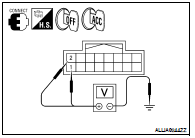
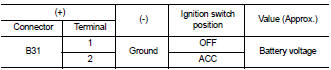
2.CHECK POWER SUPPLY CIRCUIT
Check voltage between rear view camera control unit harness connector
and ground.
Are the voltage readings as specified?
YES >> GO TO 3
NO >> Check harness between rear view camera control unit
and fuse.
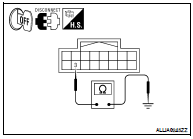
3.CHECK GROUND CIRCUIT
1. Turn ignition switch OFF.
2. Disconnect rear view camera control unit connector.
3. Check continuity between rear view camera control unit harness
connector B31 terminal 3 and ground.
Does continuity exist?
YES >> Inspection End.
NO >> Repair harness or connector.
Diagnosis Procedure
1.CHECK FUSE
Check that the following fuses of the AV control unit are not blown.
Are the fuses OK?
YES >> GO TO 2
NO >> Be sure to eliminate cause of malfuncti ...
Diagnosis Procedure
1.CHECK POWER SUPPLY CIRCUIT (REAR VIEW CAMERA SIDE)
Check voltage between rear view camera harness connector and
ground.
Is voltage reading approximately 6 volts?
YES &g ...
Other materials: MOD system limitations
WARNING
Listed below are the system limitations
for MOD. Failure to operate the vehicle
in accordance with these system limitations
could result in serious injury or
death.
Do not use the MOD system when
towing a trailer. The system may not
function properly.
Excessive noise (for example, audio ...
Operating tips
The sunload sensor, located on the top
center of the instrument panel, helps the
system maintain a constant temperature.
Do not put anything on or around this
sensor.
When the climate system is in automatic
operation and the engine coolant temperature
and outside air temperature are
low, the ...
System temporarily unavailable
For vehicles with the 7 inch (18 cm) display
For vehicles with the 5 inch (13 cm) display
When radar blockage is detected, the system
will be deactivated automatically.
The "Unavailable: Side Radar Obstruction"
warning message will appear in the vehicle
information display.
The system is not ava ...



 AV control unit
 Rear view camera