Nissan Altima (L33) 2013-2018 Owners Manual: Tilt operation
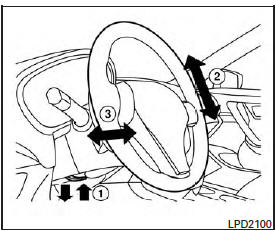
Pull the lock lever down 1 and adjust the steering
wheel up or down 2 to the desired position.
Push the lock lever up 1 firmly to lock the
steering wheel in place.
WARNING
Do not adjust the steering wheel while
driving. You could lose control of your
vehicle and cause an accident.
Pull the lock lever down 1 and adjust the steering
wheel forward or backward 3 to the desired
position.
Push the lock lever up 1 firmly to lock the
steering wheel in place.
WARNING
Do not adju ...
Other materials: Seats
WARNING
Do not ride in a moving vehicle when
the seatback is reclined. This can be
dangerous. The shoulder belt will not
be against your body. In an accident,
you could be thrown into it and receive
neck or other serious injuries.
You could also slide under the lap belt
and receive serious ...
Heater and air conditioner (manual)
(if so equipped)
Fan speed control dial
Heated seat switches (if
so
equipped)
Front defroster button
Rear window and outside
mirror
(if so equipped) defroster switch
Air recirculation button
MAX A/C / temperature control dial
Air flow control buttons
A/C (air conditioner) button
WARNING
The air ...
Outside mirrors
The outside mirror remote control only operates
when the ignition switch is placed in
the ON position.
Move the small switch 1 to select the right
or left mirror. Adjust each mirror to the desired
position using the large switch 2.
Move the small switch 1 to the center
(neutral) position to preve ...

 Tilt/telescopic steering
 Telescopic operation