Nissan Altima (L32) 2007-2012 Service Manual: Tweeter (sedan)
Description
The audio unit sends audio signals to the tweeters using the door speaker
circuits.
Diagnosis Procedure
1.HARNESS CHECK
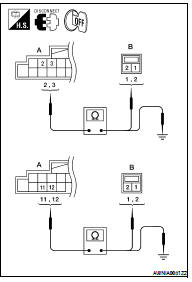
1. Disconnect audio unit connector M43 (A) and suspect tweeter
connector (B).
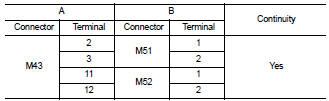
2. Check continuity between audio unit harness connector M43 (A)
and suspect tweeter harness connector (B).
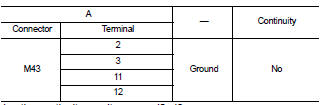
3. Check continuity between audio unit harness connector M43 (A)
and ground.
Are the continuity results as specified?
YES >> GO TO 2
NO >> • Check connector housings for disconnected or loose terminals.
• Repair harness or connector.
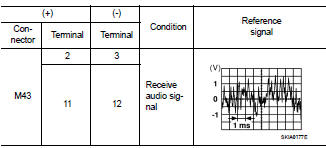
2.TWEETER SIGNAL CHECK
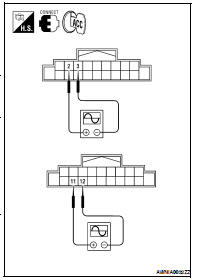
1. Connect audio unit connector and tweeter connector.
2. Turn ignition switch to ACC.
3. Push “POWER” switch.
4. Check the signal between audio unit harness connector terminals
with CONSULT-III or oscilloscope.
Is the audio signal voltage as specified?
YES >> Replace tweeter. Refer to AV-73, "Removal and Installation".
NO >> Replace audio unit. Refer to AV-72, "Removal and
Installation".
Description
The audio unit sends audio signals to the front tweeters using the door
speaker circuits.
Diagnosis Procedure
1.HARNESS CHECK
1. Disconnect audio unit connector M43 (A) and suspect ...
Description
The audio unit sends audio signals to the rear speakers using the rear
speaker circuits.
Diagnosis Procedure
1.HARNESS CHECK
1. Disconnect audio unit connector M43 (A) and suspect s ...
Other materials: Continuously Variable Transmission
(CVT)
WARNING
Do not depress the accelerator pedal
while shifting from P (Park) or N (Neutral)
to R (Reverse), D (Drive), L (Low) or
manual shift mode (if so equipped).
Always depress the brake pedal until
shifting is completed. Failure to do so
could cause you to lose control and
have an acciden ...
Interior trunk lid release
WARNING
Closely supervise children when they
are around cars to prevent them from
playing and becoming locked in the
trunk where they could be seriously injured.
Keep the car locked, with the rear
seatback and trunk lid securely latched
when not in use, and prevent children's
access to car keys.
T ...
LDW system limitations
WARNING
Listed below are the system limitations
for the LDW system. Failure to follow
the warnings and instructions for
proper use of the LDW system could result
in serious injury or death.
The system will not operate at
speeds below approximately 37 mph
(60 km/h) or if it cannot detect lane
ma ...

 Front tweeter (coupe)
 Rear speaker