Nissan Altima (L32) 2007-2012 Service Manual: ASCD Indicator
Description
The ASCD operation status is indicated by two indicators, (CRUISE and SET on
the information display) on
the combination meter.
CRUISE indicator is displayed to indicate that ASCD system is ready for
operation when MAIN switch on
ASCD steering switch is turned ON.
SET indicator is displayed when the following conditions are met.
• CRUISE indicator is displayed.
• SET/COAST switch on ASCD steering switch is turned ON while vehicle speed is
within the range of ASCD
setting.
SET indicator is displayed during ASCD control.
Refer to EC-603, "System Description" for the ASCD function.
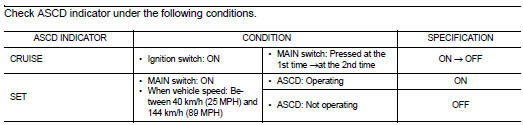
Component Function Check
1.ASCD INDICATOR FUNCTION
Is the inspection result normal?
YES >> INSPECTION END
NO >> Go to EC-948, "Diagnosis Procedure".
Diagnosis Procedure
1.CHECK DTC
Check that DTC UXXXX is not displayed.
Is the inspection result normal?
YES >> GO TO 2.
NO >> Perform trouble diagnosis for DTC UXXXX.
2.CHECK COMBINATION METER OPERATION
Refer to MWI-38, "CONSULT-III Function (METER/M&A)".
Is the inspection result normal?
YES >> GO TO 3.
NO >> Check combination meter circuit. Refer to MWI-5, "METER SYSTEM : System
Diagram".
3.CHECK INTERMITTENT INCIDENT
Refer to GI-42, "Intermittent Incident".
>> INSPECTION END
Description
When the brake pedal is depressed, ASCD brake switch is turned OFF and stop
lamp switch is turned ON.
ECM detects the state of the brake pedal by this input of two kinds (ON/OFF
s ...
Description
The ECM controls the cooling fan corresponding to the vehicle speed, engine
colant temperature, refrigerant
pressure, and air conditioner ON signal. The control system has 4-step cont ...
Other materials: Wireless charger (if so equipped)
Indicator
Charging pad
The wireless charger is located on the front
of the center console. Lay the smartphone
on the pad of the wireless charger. Charging
will start automatically. The smartphone
will be charged continuously while
the ignition switch is in the ON position.
NOTE:
The wireless ch ...
Interior trunk lid release
WARNING
Closely supervise children when they
are around cars to prevent them from
playing and becoming locked in the
trunk where they could be seriously injured.
Keep the car locked, with the rear
seatback and trunk lid securely latched
when not in use, and prevent children's
access to car keys.
T ...
Remote Engine Start
The button will be on the NISSAN
Intelligent Key if the vehicle has Remote
Engine Start. This feature allows the engine
to start from outside the vehicle.
The following features may be affected
when Remote Engine Start is used:
Vehicles with a manual climate control
system (if so equipped )will ...

 ASCD Brake switch
 Cooling fan