Nissan Altima (L32) 2007-2012 Service Manual: Bose speaker AMP
Removal and Installation - Coupe
REMOVAL
1. Disconnect the negative battery terminal.
2. Remove the trunk floor carpet and spare tire cover. Refer to INT-23, "Removal
and Installation".
3. Remove the RH trunk floor spacer.
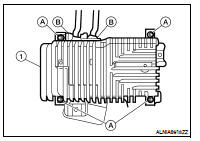
4. Remove the Bose speaker amp. screws (A), then disconnect the
Bose speaker amp. connectors (B) and remove the Bose
speaker amp. (1).
INSTALLATION
Installation is in the reverse order of removal.
Removal and Installation - Sedan
REMOVAL
1. Disconnect the negative battery terminal.
2. Open the trunk lid.
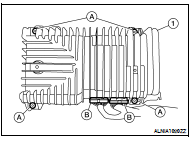
3. Remove the Bose speaker amp. screws (A), then disconnect the
Bose speaker amp. connectors (B) and remove the Bose
speaker amp. (1).
INSTALLATION
Installation is in the reverse order of removal.
Removal and Installation
REMOVAL
1. Remove the cluster lid D. Refer to IP-12, "Removal and Installation".
2. Remove the cluster lid D screws (A), then remove the audio unit
screws (B) ...
Removal and Installation
REMOVAL
1. Remove the front pillar finisher. Refer to INT-20, "Removal and
Installation" (coupe) and INT-42, "Removal
and Installation" (sedan).
2 ...
Other materials: Front power seat adjustment
(if so equipped)
Operating tips
The power seat motor has an auto-reset
overload protection circuit. If the motor
stops during operation, wait 30 seconds
then reactivate the switch.
Do not operate the power seat switch for
a long period of time when the engine is
off. This will discharge the battery.
For add ...
Intelligent Around View Monitor
system limitations
WARNING
Listed below are the system limitations
for Intelligent Around View Monitor.
Failure to operate the vehicle in accordance
with these system limitations
could result in serious injury or death.
Do not use the Intelligent Around
View Monitor with the outside mirrors
in the stored positio ...
Lane Departure Warning (LDW)
WARNING
Failure to follow the warnings and instructions
for proper use of the LDW
system could result in serious injury or
death.
This system is only a warning device
to inform the driver of a potential unintended
lane departure. It will not
steer the vehicle or prevent loss of
control. It is ...

 Audio unit
 Front tweeter