Nissan Altima (L32) 2007-2012 Service Manual: Audio unit
Removal and Installation
REMOVAL
1. Remove the cluster lid D. Refer to IP-12, "Removal and Installation".
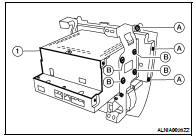
2. Remove the cluster lid D screws (A), then remove the audio unit
screws (B) and the audio unit (1).
INSTALLATION
Installation is in the reverse order of removal.
Removal and Installation - Coupe
REMOVAL
1. Disconnect the negative battery terminal.
2. Remove the trunk floor carpet and spare tire cover. Refer to INT-23, "Removal
and Installation&quo ...
Other materials: Operating range
The Intelligent Key functions can only be
used when the Intelligent Key is within the
specified operating range from the request
switch (if so equipped) 1.
When the Intelligent Key battery is discharged
or strong radio waves are present
near the operating location, the Intelligent
Key system’s op ...
NissanConnect Owner’s Manual
Refer to the digital NissanConnect Owner’s
manual using the QR code on this
page, or your printed NissanConnect
Owner’s manual (if so equipped). This
manual includes the following information:
NissanConnect Services (if so equipped)
Navigation system (if so equipped)
Audio system
Apple Car ...
Booster seats
For additional information on installing a
booster seat in your vehicle, follow the instructions
outlined in this section.
Precautions on booster seats
WARNING
If a booster seat and seat belt are not
used properly, the risk of a child being
injured or killed in a sudden stop or collision
greatly inc ...

 On-vehicle repair
 Bose speaker AMP