Nissan Altima (L32) 2007-2012 Service Manual: Clutch piping
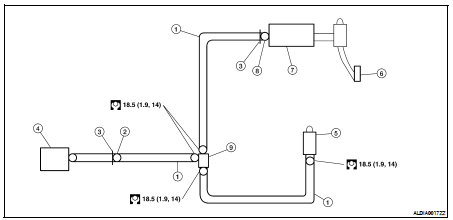
Exploded View
1. Clutch tube
2. CSC connector
3. Lock pin
4. CSC
5. Air bleed connector valve
6. Clutch pedal
7. Clutch master cylinder
8. Clutch master cylinder connector
9. Branch connector
Removal and Installation
CAUTION:
Do not spill clutch fluid onto painted surfaces. If it spills, wipe up
immediately and wash the affected
area with water.
REMOVAL
1. Remove the air cleaner and air duct. Refer to EM-19, "Removal and
Installation" for QR25DE and EM-
123, "Removal and Installation" for VQ35DE.
2. Remove the lock pin and disconnect the clutch master cylinder connector.
3. Remove the clutch tubes from the branch connector.
4. Remove the clutch tube and air bleed connector valve.
5. Remove the branch connector.
6. Remove lock pin and disconnect the CSC connector.
INSTALLATION
Installation is in the reverse order of removal.
• Make sure that all tubes are fully installed into connectors.
• Make sure that all connector lock pins are fully installed.
• After installation, bleed clutch hydraulic system. Refer to CL-7, "Air
Bleeding Procedure".
Removal and Installation
REMOVAL
1. Remove the air cleaner and air duct. Refer to EM-19, "Removal and
Installation" for QR25DE and EM-
123, "Removal and Installation" for VQ35 ...
Other materials: Phone display screen
The Phone screen can be displayed by
pressing thebutton on the control
panel.
The following options are displayed:
Quick Dial
Displays the Quick Dial screen. For additional
information, see "Quick dial".
Phonebook
Displays the Phonebook screen. For additional
information, see "Making a call ...
Precautions on SRS
This SRS section contains important information
concerning the following systems:
Driver and front passenger supplemental
front-impact air bag (NISSAN Advanced
Air Bag System)
Front seat-mounted side-impact supplemental
air bag
Rear outboard seat-mounted side-impact
supplemental air bag
Roo ...
Engine compartment check locations
2.0L 4 cylinder (KR20DDET engine model)
Engine coolant reservoir
Drive belt location
Engine oil filler cap
Brake fluid reservoir
Battery
Fuse/Fusible link box
Air cleaner
Radiator cap
Engine oil dipstick
Windshield-washer fluid reservoir
Refer to the page number indicated in
parenth ...

 Clutch master cylinder
 Removal and installation