Nissan Altima (L32) 2007-2012 Service Manual: Combination switch input circuit
Diagnosis Procedure
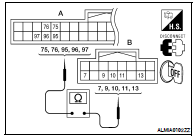
1. CHECK INPUT 1 - 5 SYSTEM CIRCUIT FOR OPEN
1. Turn the ignition switch OFF.
2. Disconnect the BCM and combination switch.
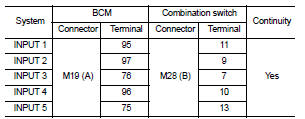
3. Check continuity between BCM harness connector and combination
switch harness connector.
Does continuity exist?
YES >> GO TO 2
NO >> Repair or replace harness.
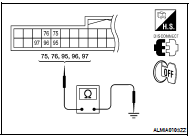
2. CHECK INPUT 1 - 5 SYSTEM CIRCUIT FOR SHORT
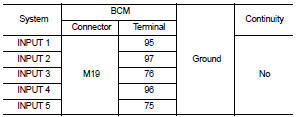
Check for continuity between BCM harness connector and ground.
Does continuity exist?
YES >> Repair or replace harness.
NO >> GO TO 3
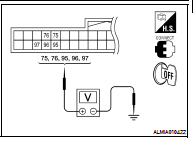
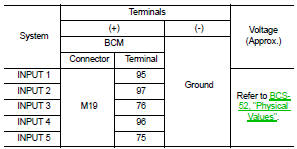
3. CHECK BCM OUTPUT VOLTAGE
1. Connect the BCM.
2. Check voltage between BCM harness connector and ground.
Is the measurement normal?
YES >> GO TO 4
NO >> Replace BCM. Refer to BCS-96, "Removal and Installation".
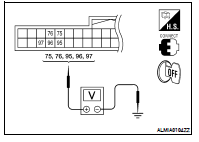
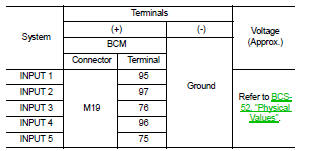
4. CHECK BCM INPUT SIGNAL
1. Connect the combination switch.
2. Turn ON any switch in the system that is malfunctioning.
3. Check voltage between BCM harness connector and ground.
Is the measurement normal when any of the switches is turned ON?
YES >> Replace BCM. Refer to BCS-96, "Removal and Installation".
NO >> Replace the combination switch. Refer to WW-121, "Removal and
Installation".
Special Repair Requirement
1. REQUIRED WORK WHEN REPLACING BCM
Initialize control unit. Refer to BCS-6, "CONFIGURATION (BCM) : Special
Repair Requirement".
>> Work End.
Diagnosis Procedure
1. CHECK FUSE AND FUSIBLE LINK
Check if the following BCM fuse or fusible link are blown.
Is the fuse or fusible link blown?
YES >> Replace the blown fuse or fusible li ...
Diagnosis Procedure
1. CHECK OUTPUT 1 - 5 SYSTEM CIRCUIT FOR OPEN
1. Turn the ignition switch OFF.
2. Disconnect the BCM and combination switch.
3. Check continuity between BCM harness connect ...
Other materials: Automatic brake hold (if so equipped)
The automatic brake hold function maintains
the braking force without the driver
having to depress the brake pedal when
the vehicle is stopped at a traffic light or
intersection. As soon as the driver depresses
the accelerator pedal again, the
automatic brake hold function is deactivated
and the bra ...
Warning/Indicator lights (red)
For additional information on warnings
and indicators, see "Vehicle information
display - 5 inch (13 cm) Type A" or
"Vehicle information display - 7 inch (18cm)
Type B".
or
Brake warning
light
This light functions for both the parking
brake and the foot brake systems.
Parking brake indicator (if s ...
How to switch the display
With the ignition switch in the ON position,
press the CAMERA button or move the shift
lever to the R (Reverse) position to operate
the Intelligent Around View Monitor.
The Intelligent Around View Monitor displays
different split screen views depending
on the position of the shift lever. Press
the ...

 Power supply and ground circuit
 Combination switch output circuit