Nissan Altima (L32) 2007-2012 Service Manual: Control unit
Removal and Installation
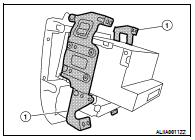
FRONT AIR CONTROL
Removal
1. Remove cluster lid D. Refer to IP-12, "Removal and Installation".
2. Remove the two brackets (1) and remove the front air control.
Installation
Installation is in the reverse order of removal.
Removal and Installation
REMOVAL
1. Remove the instrument lower cover LH. Refer to IP-12, "Removal and
Installation".
2. Remove the in-vehicle sensor screw and remove the in-vehicle
...
Other materials: Programming HomeLink
If you have any questions or are having
difficulty programming your HomeLink
buttons, refer to the HomeLink website at:
www.homelink.com or call 1-800-355-3515.
NOTE:
Place the ignition switch in the ON position
(without starting the engine) when
programming HomeLink. It is also recommended that
ane ...
System temporarily unavailable
Condition A:
The warning and assist functions of the I-LI
system are not designed to work under the
following conditions:
When you operate the lane change signal
and change the traveling lanes in the direction
of the signal. (The I-LI system
will be deactivated for approximately 2
seconds afte ...
RearView Monitor system operation
With the ignition switch in the ON position,
move the shift lever to the R (Reverse) position
to operate the RearView Monitor.
How to read the displayed lines
Guiding lines which indicate the vehicle
width and distances to objects with reference
to the vehicle body line A are displayed
on the monit ...

 On-vehicle repair
 In-vehicle sensor