
Nissan Altima (L32) 2007-2012 Service Manual: Cooling fan
Removal and Installation
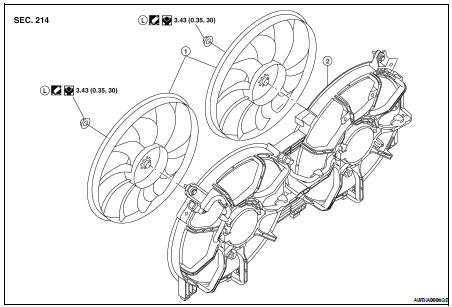
1. Fan blade
2. Fan shroud and motor assembly
REMOVAL
1. Drain engine coolant from the radiator. Refer to CO-12, "Changing Engine
Coolant".
CAUTION:
Perform when engine is cold.
2. Remove air cleaner duct assembly. Refer to EM-25, "Removal and
Installation".
3. Disconnect radiator upper hose.
4. Disconnect fan motor connectors.
5. Remove radiator cooling fan assembly.
INSTALLATION
Installation is in the reverse order of removal.
• After installation refill engine coolant and check for leaks. Refer to CO-12,
"Changing Engine Coolant" and
CO-11, "System Inspection".
CAUTION:
Do not spill coolant in engine compartment. Use a shop cloth to absorb coolant.
• Cooling fan is controlled by ECM. For details, refer to EC-613, "System
Description".
Disassembly and Assembly of Cooling Fan
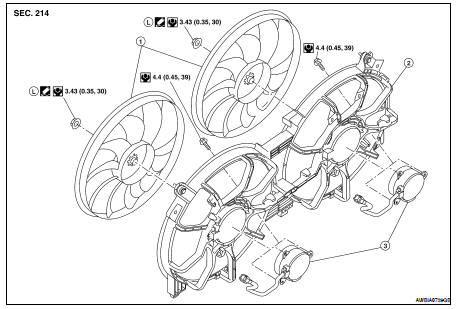
1. Fan blade
2. Fan shroud
3. Fan motor
DISASSEMBLY
1. Remove fan blade nut.
2. Remove fan blade from fan motor.
3. Remove fan motor bolts and remove fan motor from fan shroud.
ASSEMBLY
Assembly is in the reverse order of disassembly.
Removal and Installation
1. Radiator
2. CVT oil cooler hose (if equipped)
3. Radiator hose (upper)
4. Radiator hose (lower)
5. Cooling fan
6. Reservoir tank
7. Reservoir hose
8. Radiator fil ...
Removal and Installation
1. Water pump
2. Gaskets
3. Water pump housing
4. Water pipe
5. O-ring
WARNING:
Never remove the radiator cap when the engine is hot. Serious burns could occur
from ...
Other materials: Trip computer
1. Home
This display indicates the home screen.
2. Vehicle speed
The vehicle speed mode shows the current
vehicle speed and the average vehicle
speed since the last reset.
Average vehicle speed:
Press and hold the OK button on the steering
wheel to bring up the drive computer Reset
menu, and follow ...
Vehicle information display warnings
and indicators
The following messages may appear in
your vehicle information display.
Place the key near the start
switch
This indicator appears when the battery of
the Intelligent Key is low and when the Intelligent
Key system and the vehicle are not
communicating normally.
If this appears, touch the ignition s ...
Vehicle information display - 7 inch (18 cm) Type B (if so equipped)
The vehicle information display is located
to the left of the speedometer. It displays
such items as:
Vehicle settings
Indicators and warnings
Information/warning messages
Tire pressure information
Drive computer information
Cruise control system information
Driving Aids (if so equipped)
P ...