Nissan Altima (L32) 2007-2012 Service Manual: Front tweeter
Removal and Installation
REMOVAL
1. Remove the front pillar finisher. Refer to INT-15, "Removal and
Installation" (coupe) and INT-36, "Removal
and Installation" (sedan).
2. Remove tweeter speaker grille. Refer to IP-12, "Removal and Installation".
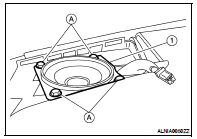
3. Remove the tweeter speaker screws (A), disconnect the tweeter
speaker connector and remove the tweeter speaker (1).
INSTALLATION
Installation is in the reverse order of removal.
Removal and Installation
REMOVAL
1. Remove the cluster lid D. Refer to IP-12, "Removal and Installation".
2. Remove the cluster lid D screws (A), then remove the audio unit
screws (B) ...
Removal and Installation
REMOVAL
1. Remove the front door finisher. Refer to INT-12, "Removal and
Installation" (coupe) and INT-34, "Removal
and Installation" (sedan).
2. ...
Other materials: Warning/Indicator lights (red)
For additional information on warnings
and indicators, see "Vehicle information
display - 5 inch (13 cm) Type A" or
"Vehicle information display - 7 inch (18cm)
Type B".
or
Brake warning
light
This light functions for both the parking
brake and the foot brake systems.
Parking brake indicator (if s ...
Tire Pressure Monitoring System
(TPMS)
Each tire, including the spare (if provided),
should be checked monthly when cold and
inflated to the inflation pressure recommended
by the vehicle manufacturer on
the vehicle placard or tire inflation pressure
label. (If your vehicle has tires of a different
size than the size indicated on the vehi ...
Head restraints/headrests
WARNING
Head restraints/headrests supplement
the other vehicle safety systems. They
may provide additional protection
against injury in certain rear end collisions.
Adjustable head restraints/
headrests must be adjusted properly,
as specified in this section. Check the
adjustment after someone else ...

 Audio unit
 Front door speaker