Nissan Altima (L32) 2007-2012 Service Manual: Front door speaker
Removal and Installation
REMOVAL
1. Remove the front door finisher. Refer to INT-12, "Removal and
Installation" (coupe) and INT-34, "Removal
and Installation" (sedan).
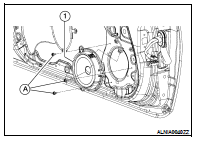
2. Remove the front door speaker screws (A), then disconnect the
front door speaker connector and remove the front door speaker
(1).
INSTALLATION
Installation is in the reverse order of removal.
Removal and Installation
REMOVAL
1. Remove the front pillar finisher. Refer to INT-15, "Removal and
Installation" (coupe) and INT-36, "Removal
and Installation" (sedan).
2. ...
Removal and Installation - Coupe
REMOVAL
1. Remove the trunk front finisher. Refer to INT-23, "Removal and
Installation".
2. Remove the rear speaker screws (A), then disconnect the r ...
Other materials: Bluetooth connecting procedure
NOTE:
The connecting procedure must be performed
when the vehicle is stationary. If
the vehicle starts moving during the procedure,
the procedure will be canceled.
To connect a phone to the Bluetooth
Hands-Free Phone System:
Bluetooth Connecting Procedure
1. Touch the "Settings" key on the Launch
B ...
Interior trunk lid release
WARNING
Closely supervise children when they
are around cars to prevent them from
playing and becoming locked in the
trunk where they could be seriously injured.
Keep the car locked, with the rear
seatback and trunk lid securely latched
when not in use, and prevent children's
access to car keys.
T ...
Bluetooth Hands-Free Phone System
WARNING
Use a phone after stopping your vehicle
in a safe location. If you have to
use a phone while driving, exercise
extreme caution at all times so full
attention may be given to vehicle
operation.
If you are unable to devote full attention
to vehicle operation while talking
on the phon ...

 Front tweeter
 Rear speaker