Nissan Altima (L32) 2007-2012 Service Manual: Front wiper
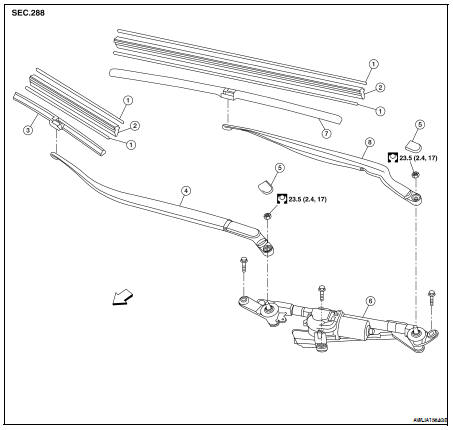
Exploded View
1. Rib (part of wiper blade refill)
2. Wiper blade refill
3. Front RH wiper blade assembly (includes
wiper blade refill)
4. Front RH wiper arm
5. Wiper arm cap
6. Front wiper drive assembly
7. Front LH wiper blade assembly (includes
wiper blade refill)
8. Front LH wiper arm
Removal and Installation
REMOVAL
1. Remove the front wiper blade. Refer to WW-115, "FRONT WIPER BLADE :
Removal and Installation".
2. Hold the wiper blade refill lip at the end ( ...
Other materials: Windows
Power windows
WARNING
Make sure that all passengers have
their hands, etc., inside the vehicle
while it is in motion and before closing
the windows. Use the window
lock switch to prevent unexpected
use of the power windows.
To help avoid risk of injury or death
through unintended operation ...
Warning/Indicator lights (other)
For additional information on warnings
and indicators, see "Vehicle information
display-5 inch (13 cm) Type A" or
"Vehicle information display 7 inch (18 cm)
Type B".
Automatic brake hold
indicator light (white/green)
(if so equipped)
The automatic brake hold indicator light
(white) illuminates whe ...
RCTA system limitations
WARNING
Listed below are the system limitations
for the RCTA system. Failure to operate
the vehicle in accordance with these
system limitations could result in serious
injury or death.
Always check surroundings and turn
to check what is behind you before
backing up. The radar sensors detect
ap ...


 On-vehicle repair
 Front wiper blade refill