Nissan Altima (L32) 2007-2012 Service Manual: Front wiper auto stop signal circuit
Component Function Check
1. CHECK FRONT WIPER (AUTO STOP) OPERATION
1. Select "FRONT WIPER STOP" of IPDM E/R DATA MONITOR item.
2. Operate the front wiper.
3. With the front wiper operation, check the monitor status.
Is the status of item normal?
YES >> Auto stop signal circuit is normal.
NO >> Refer to WW-24, "Diagnosis Procedure".
Diagnosis Procedure
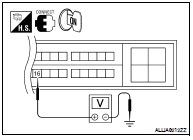
1. CHECK FRONT WIPER MOTOR (AUTO STOP) OUTPUT VOLTAGE
1. Turn the ignition switch OFF.
2. Disconnect front wiper motor.
3. Turn the ignition switch ON.
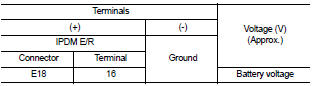
4. Check voltage between IPDM E/R harness connector and
ground.
Is the measurement normal?
YES >> GO TO 2
NO >> Replace IPDM E/R. Refer to PCS-48, "Removal and Installation".
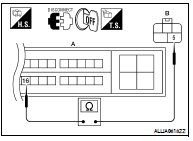
2. CHECK FRONT WIPER MOTOR (AUTO STOP) CIRCUIT CONTINUITY
1. Turn the ignition switch OFF.
2. Disconnect IPDM E/R.
3. Check continuity between IPDM E/R harness connector (A) and
front wiper motor harness connector (B).
Does continuity exist?
YES >> GO TO 3
NO >> Repair or replace harness.
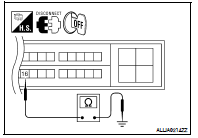
3. CHECK FRONT WIPER MOTOR (AUTO STOP) SHORT CIRCUIT
Check continuity between IPDM E/R harness connector and ground.
Does continuity exist?
YES >> Repair or replace harness.
NO >> Replace front wiper motor. Refer to WW-116, "FRONT
WIPER DRIVE ASSEMBLY : Removal and Installation".
Component Function Check
1. CHECK FRONT WIPER HI OPERATION
1. Start IPDM E/R auto active test. Refer to PCS-14, "Diagnosis Description".
2. Check that the front wiper operates at the ...
Diagnosis Procedure
1.CHECK FRONT WIPER MOTOR (GND) OPEN CIRCUIT
1. Turn the ignition switch OFF.
2. Disconnect front wiper motor.
3. Check continuity between front wiper motor harness connec ...
Other materials: Intelligent Cruise Control (ICC)
(for vehicles with ProPILOT Assist)
WARNING
Failure to follow the warnings and instructions
for proper use of the ICC system
could result in serious injury or
death.
The ICC system is only an aid to assist
the driver and is not a collision
warning or avoidance device. It is recommended for
highway use only and
it is not intended ...
Trip computer
1. Home
This display indicates the home screen.
2. Vehicle speed
The vehicle speed mode shows the current
vehicle speed and the average vehicle
speed since the last reset.
Average vehicle speed:
Press and hold the OK button on the steering
wheel to bring up the drive computer Reset
menu, and follow ...
Lane Departure Warning (LDW)
WARNING
Failure to follow the warnings and instructions
for proper use of the LDW
system could result in serious injury or
death.
This system is only a warning device
to inform the driver of a potential unintended
lane departure. It will not
steer the vehicle or prevent loss of
control. It is ...





 Front wiper motor hi circuit
 Front wiper motor ground circuit