Nissan Altima (L33) 2013-2018 Owners Manual: How to use the vehicle information display
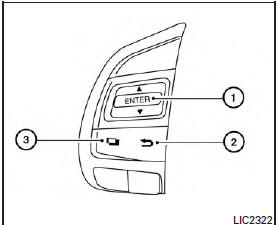
The vehicle information display can be changed
using the buttons and ENTER located
on
the steering wheel.
1. — navigate through the items in
vehicle
information
ENTER — change or select an item in the
vehicle information display
2. — go back to the previous menu
3. — select/enter the Vehicle
information
menu items or to change from one display
screen to the next (i.e. trip, TPMS, Fuel
economy)
The ENTER and buttons also control
audio
and control panel functions. For additional information
see, “Steering wheel switch for audio
control” in “Monitor, climate, audio, phone and
voice recognition systems” section.
The vehicle information display is located to the
left of the speedometer. It displays such items as:
● Vehicle settings
● Trip computer information
● Drive system warnings and ...
When the vehicle in placed in the ON or ACC
position the screens that display in the vehicle
information include:
● Active system status (if so equipped)
● Trip computer
● Tire ...

 and ENTER located
 — navigate through the items in
 — go back to the previous menu
 — select/enter the Vehicle
 buttons also control
 Vehicle Information Display
 Startup display