Nissan Altima (L32) 2007-2012 Service Manual: Oil filter
Removal and Installation
REMOVAL
1. Remove the engine undercover.
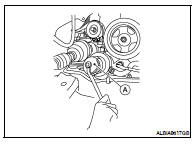
2. Remove the oil filter using Tool (A) as shown.
WARNING:
• Be careful not to get burned, the engine and engine oil
may be hot.
CAUTION:
• When removing, prepare a shop cloth to absorb any oil
leakage or spillage.
• Do not allow engine oil to adhere to the drive belts.
• Completely wipe off any oil that adheres to the engine and
the vehicle.
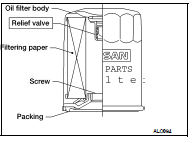
• The oil filter has a built in pressure relief valve. Use a genuine
NISSAN oil filter or equivalent
INSTALLATION
1. Remove foreign materials adhering to the oil filter installation surface.
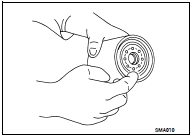
2. Apply clean engine oil to the oil seal contact surface of the new
oil filter.
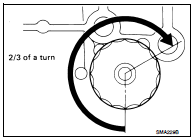
3. Screw the oil filter manually until it touches the installation surface,
then tighten it by 2/3 turn. Or tighten to specification below.
4. Check the oil level and add engine oil as necessary. Refer to LU-23.
5. After warming up the engine, check for any engine oil leaks.
Changing Engine Oil
WARNING:
• Be careful not to burn yourself, as the engine oil may be hot.
• Prolonged and repeated contact with used engine oil may cause skin cancer; try
to avoid dire ...
Removal and Installation
1. Ignition coil
2. Spark plug
3. Rocker cover RH
4. Rocker cover LH
REMOVAL
1. Remove the ignition coil. Refer to EM-145, "Removal and Installation LH"
a ...
Other materials: Automatic operation
Cooling and/or dehumidified
heating (AUTO)
This mode may be used all year round as
the system automatically works to keep a
constant temperature. Air flow distribution,
air intake control, and fan speed are also
controlled automatically.
1. Press the AUTO button on.
2. Turn the temperature control ...
Engine compartment check locations
2.0L 4 cylinder (KR20DDET engine model)
Engine coolant reservoir
Drive belt location
Engine oil filler cap
Brake fluid reservoir
Battery
Fuse/Fusible link box
Air cleaner
Radiator cap
Engine oil dipstick
Windshield-washer fluid reservoir
Refer to the page number indicated in
parenth ...
Avoiding collision and rollover
WARNING
Failure to operate this vehicle in a safe
and prudent manner may result in loss
of control or an accident.
Be alert and drive defensively at all times.
Obey all traffic regulations. Avoid excessive
speed, high speed cornering, or sudden
steering maneuvers, because these driving
practices co ...



 Engine oil
 Spark plug