Nissan Altima (L32) 2007-2012 Service Manual: On-vehicle repair
POWER WINDOW MAIN SWITCH
Removal and Installation
REMOVAL
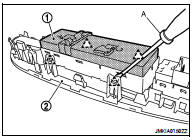
1. Remove the power window main switch finisher (2). Refer to
INT-34, "Removal and Installation".
2. Power window main switch (1) is removed from power window
main switch finisher (2) using a suitable tool (A).
CAUTION:
Do not fold the pawl of power window main switch finisher.
NOTE:
The same procedure is also performed for front power window and
door lock/unlock switch RH, and rear power window switch (LH &
RH).
INSTALLATION
Installation is in the reverse order of removal.
PRE-INSPECTION FOR DIAGNOSTIC
Basic Inspection
1.INSPECTION START
1. Check the service history.
2. Check the following parts.
• Fuse/circuit breaker blown.
• Poor connection, open or s ...
Other materials: How to park with predicted course
lines
WARNING
If the tires are replaced with different
sized tires, the predicted course lines
may be displayed incorrectly.
On a snow-covered or slippery road,
there may be a difference between
the predicted course line and the actual
course line.
If the battery is disconnected or becomes
disch ...
Steering wheel switch for audio control
Menu control switch/ OK
button
(back) switch
(SEEK/TRACK) buttons
Volume control switch
SEEK/TRACK buttons
For most audio sources, pushing the tuning
switches for more than 1.5 seconds
provides a different function than pushing
for less than 1.5 seconds.
AM and FM:
Press theorbuttons
f ...
Rear-facing child restraint installation
using LATCH
For additional information, see all Warnings
and Cautions in the "Child safety"
and "Child restraints" before installing
a child restraint.
Do not use the lower anchors if the combined
weight of the child and the child restraint
exceeds 65 lbs. (29.5 kg). If the combined
weight of the child and the ...


 On-vehicle maintenance
 Power window control system lh&rh front anti-pinch-coupe