Nissan Altima (L32) 2007-2012 Service Manual: Rear seat
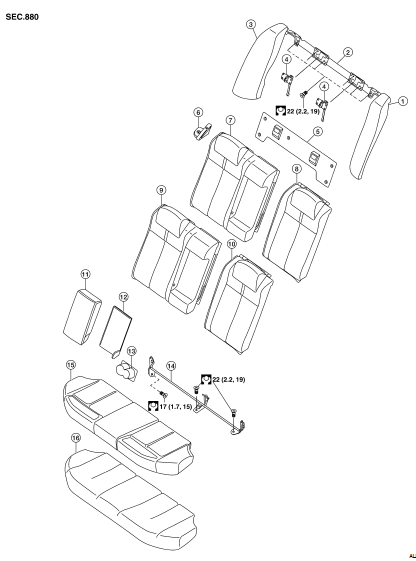
Exploded View
BENCH SEAT
1. Rear seat side bolster assembly LH
2. Rear seatback latch mount
3. Rear seat side bolster assembly RH
sunwin 4. Rear seatback latch
5. Rear seatback trim panel
6. Seat belt guide
7. Rear seatback pad RH
8. Rear seatback pad LH
9. Rear seatback pad trim RH
10. Rear seatback pad trim LH
11. Armrest
12. Armrest trim panel
13. Cup holder
14. Rear seatback hinge assembly
15. Rear seat cushion trim
16. Rear seat cushion
Removal and Installation
REMOVAL
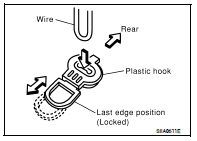
1. Remove the rear seat cushion trim and pad.
• Pull the lock at the front bottom of the seat cushion forward
(one for each side), and pull the seat cushion upward to
release the wire from the plastic hook, then pull the seat cushion
forward to remove.
2. Remove the seat belt webbing from the guides.
3. Fold seatbacks forward.
4. Remove upper seatback trim panel.
5. Remove rear side bolster bolts.
6. Lock seatbacks in upright position.
7. Remove the seatback hinge anchor bolts and nut.
8. Remove the seatback assembly.
INSTALLATION
Installation is in the reverse order of removal.
Exploded View
DRIVER'S SEAT
1. Headrest
2. Headrest holder (locked)
3. Headrest holder (free)
4. Seatback board
5. Seatback assembly
6. Slide cover
7. Seat belt buckle
8. Seat harness
9. ...
Other materials: NissanConnect Owner’s Manual
Refer to the digital NissanConnect Owner’s
manual using the QR code on this
page, or your printed NissanConnect
Owner’s manual (if so equipped). This
manual includes the following information:
NissanConnect Services (if so equipped)
Navigation system (if so equipped)
Audio system
Apple Car ...
How to park with predicted course
lines
WARNING
If the tires are replaced with different
sized tires, the predicted course lines
may be displayed incorrectly.
On a snow-covered or slippery road,
there may be a difference between
the predicted course line and the actual
course line.
If the battery is disconnected or becomes
disch ...
RCTA system operation
For vehicles with the 7 inch (18 cm) display
Side BSW/RCTA Indicator Light
The RCTA system can help alert the driver
of an approaching vehicle when the driver
is backing out of a parking space.
For vehicles with the 5 inch (13 cm) display
When the shift position is in R (Reverse) and
the vehicl ...

 Front seat
 Disassembly and assembly