Nissan Altima (L32) 2007-2012 Service Manual: Rear speaker
Removal and Installation - Coupe
REMOVAL
1. Remove the trunk front finisher. Refer to INT-23, "Removal and
Installation".
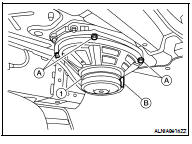
2. Remove the rear speaker screws (A), then disconnect the rear
speaker connector (B) and remove the rear speaker (1).
INSTALLATION
Installation is in the reverse order of removal.
Removal and Installation - Sedan
REMOVAL
1. Remove the rear parcel shelf finisher. Refer to INT-38, "Removal and
Installation".
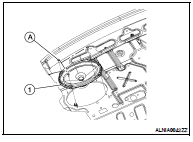
2. Remove the rear speaker screws (A), then disconnect the rear
speaker and remove the rear speaker (1).
INSTALLATION
Installation is in the reverse order of removal.
Removal and Installation
REMOVAL
1. Remove the front door finisher. Refer to INT-12, "Removal and
Installation" (coupe) and INT-34, "Removal
and Installation" (sedan).
2. ...
Removal and Installation - Coupe
REMOVAL
1. Disconnect the battery negative terminal.
2. Remove the trunk floor carpet and spare tire cover. Refer to INT-23, "Removal
and Installation" ...
Other materials: Avoiding collision and rollover
WARNING
Failure to operate this vehicle in a safe
and prudent manner may result in loss
of control or an accident.
Be alert and drive defensively at all times.
Obey all traffic regulations. Avoid excessive
speed, high speed cornering, or sudden
steering maneuvers, because these driving
practices co ...
Warning/Indicator lights (red)
For additional information on warnings
and indicators, see "Vehicle information
display - 5 inch (13 cm) Type A" or
"Vehicle information display - 7 inch (18cm)
Type B".
or
Brake warning
light
This light functions for both the parking
brake and the foot brake systems.
Parking brake indicator (if s ...
USB/iPod charging ports (if so equipped)
Front (Type A) (if so equipped)
Front (Type B) (if so equipped)
Front (Type C) (if so equipped)
Rear (if so equipped)
Type-C USB
Type-A USB
There are USB charging ports located in
the rear seat area on the back of the center
console. These ports will charge compatible
devices.
NOTE:
Not al ...

 Front door speaker
 Satellite radio tuner