Nissan Altima (L32) 2007-2012 Service Manual: Rear stabilizer
Removal and Installation
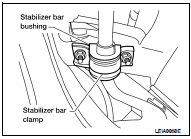
Removal
1. Disconnect the stabilizer bar from connecting rod, using power tools.
2. Remove the stabilizer bar clamps and bushings using power
tools.
3. Remove the stabilizer bar.
Installation
Installation is in the reverse order of removal.
Removal and Installation
Removal
1. Remove the rear suspension assembly. Refer to RSU-12, "Removal and
Installation".
2. Remove the radius rod using power tools.
Installation
Insta ...
Removal and Installation
Removal
1. Remove the rear suspension assembly. Refer to RSU-12, "Removal and
Installation".
2. Remove the connecting rod bracket from the suspension arm usin ...
Other materials: Tachometer
5 inch (13 cm) Type A (if so equipped)
The tachometer indicates engine speed in
revolutions per minute (rpm).
Do not rev the engine into the red zone 1.
7 inch (18 cm) Type B (if so equipped)
CAUTION
When engine speed approaches the
red zone, shift to a higher gear or reduce
engine speed. Operati ...
MOD system limitations
WARNING
Listed below are the system limitations
for MOD. Failure to operate the vehicle
in accordance with these system limitations
could result in serious injury or
death.
Do not use the MOD system when
towing a trailer. The system may not
function properly.
Excessive noise (for example, audio ...
Automatic brake hold (if so equipped)
The automatic brake hold function maintains
the braking force without the driver
having to depress the brake pedal when
the vehicle is stopped at a traffic light or
intersection. As soon as the driver depresses
the accelerator pedal again, the
automatic brake hold function is deactivated
and the bra ...

 Radius rod
 Suspension ARM