Nissan Altima (L32) 2007-2012 Service Manual: Rear view camera control unit
Diagnosis Procedure
1.CHECK FUSE
Check that the following fuses of the rear view camera control unit are not
blown.
Are the fuses OK?
YES >> GO TO 2
NO >> Be sure to eliminate cause of malfunction before installing new fuse.
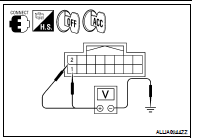
2.CHECK POWER SUPPLY CIRCUIT
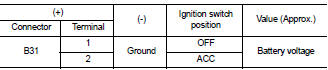
Check voltage between rear view camera control unit harness connector
and ground.
Are the voltage readings as specified?
YES >> GO TO 3
NO >> Check harness between rear view camera control unit
and fuse.
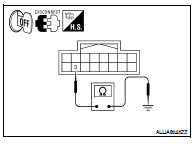
3.CHECK GROUND CIRCUIT
1. Turn ignition switch OFF.
2. Disconnect rear view camera control unit connector.
3. Check continuity between rear view camera control unit harness
connector B31 terminal 3 and ground.
Does continuity exist?
YES >> Inspection End.
NO >> Repair harness or connector.
Diagnosis Procedure
1.CHECK FUSE
Check that the following fuses of the AV control unit are not blown.
Are the fuses OK?
YES >> GO TO 2
NO >> Be sure to eliminate cause of malfunctio ...
Diagnosis Procedure
1.CHECK POWER SUPPLY CIRCUIT (REAR VIEW CAMERA SIDE)
Check voltage between rear view camera harness connector and
ground.
Is inspection result normal?
YES >> GO TO 4 ...
Other materials: RCTA system operation
For vehicles with the 7 inch (18 cm) display
Side BSW/RCTA Indicator Light
The RCTA system can help alert the driver
of an approaching vehicle when the driver
is backing out of a parking space.
For vehicles with the 5 inch (13 cm) display
When the shift position is in R (Reverse) and
the vehicl ...
Cruise control operations
The cruise control allows driving at a speed
between 25 - 89 mph (40 - 144 km/h) without
keeping your foot on the accelerator
pedal.
To turn on the cruise control, push the
cruise control switch on. The
indicator
in the instrument panel will illuminate.
To set cruising speed, accelerate the veh ...
Intelligent Around View Monitor
system limitations
WARNING
Listed below are the system limitations
for Intelligent Around View Monitor.
Failure to operate the vehicle in accordance
with these system limitations
could result in serious injury or death.
Do not use the Intelligent Around
View Monitor with the outside mirrors
in the stored positio ...



 AV control unit
 Rear view camera