Nissan Altima (L32) 2007-2012 Service Manual: Satellite radio antenna
Removal and Installation
REMOVAL
1. Lower the headliner at the rear. Refer to INT-20, "Removal and
Installation" (coupe) and INT-42,
"Removal and Installation" (sedan).
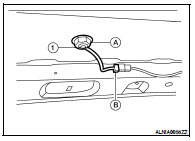
2. Remove the satellite radio antenna nut (A), then disconnect the
satellite radio antenna connector (B) and remove the satellite
radio antenna (1).
INSTALLATION
Installation is in the reverse order of removal.
Removal and Installation - Coupe
REMOVAL
1. Disconnect the battery negative terminal.
2. Remove the trunk floor carpet and spare tire cover. Refer to INT-23, "Removal
and Installation" ...
Removal and Installation
REMOVAL
1. Remove the driver airbag module. Refer to SR-5, "Removal and
Installation".
2. Remove the steering wheel switch assembly screws (A), then
remove ...
Other materials: Vehicle information display warnings
and indicators
The following messages may appear in
your vehicle information display.
Place the key near the start
switch
This indicator appears when the battery of
the Intelligent Key is low and when the Intelligent
Key system and the vehicle are not
communicating normally.
If this appears, touch the ignition s ...
ProPILOT Assist (if so equipped)
WARNING
Failure to follow the warnings and instructions
for proper use of the ProPILOT
Assist system could result in serious
injury or death.
ProPILOT Assist is not a self-driving
system. Within the limits of its capabilities,
as described in this manual, it
helps the driver with certain drivin ...
MOD system operation
The MOD system will turn on automatically
under the following conditions:
When the shift lever is in the R (Reverse)
position.
When the CAMERA button is pressed to
activate the camera view on the display.
When vehicle speed decreases below approximately
6 mph (10 km/h) and the
camera screen ...

 Satellite radio tuner
 Steering switch