Nissan Altima (L32) 2007-2012 Service Manual: Satellite radio tuner
Diagnosis Procedure
1.CHECK FUSES
Check that the following fuses are not blown.
Are the fuses OK?
YES >> GO TO 2
NO >> If fuse is blown, be sure to eliminate cause of malfunction before
installing new fuse.
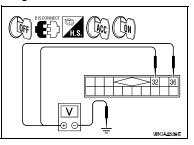
2.POWER SUPPLY CIRCUIT CHECK
1. Turn ignition switch OFF.
2. Disconnect satellite radio tuner (factory installed) connector B57.
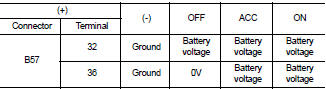
3. Check voltage between the satellite radio tuner (factory installed) and
ground.
Are the voltage results as specified?
YES >> GO TO 3
NO >> • Check connector housings for disconnected or loose
terminals.
• Repair harness or connector.
3.GROUND CIRCUIT CHECK
Inspect satellite radio tuner (factory installed) case ground.
Does case ground pass inspection?
YES >> Inspection End.
NO >> Repair satellite radio tuner (factory installed) case ground.
Diagnosis Procedure
1.CHECK FUSES
Check that the following fuses are not blown.
Are the fuses OK?
YES >> GO TO 2
NO >> If fuse is blown, be sure to eliminate cause of malfunction be ...
AUDIO UNIT
Diagnosis Procedure
1.CHECK FUSES
Check that the following fuses are not blown.
Are the fuses OK?
YES >> GO TO 2
NO >> If fuse is blown, be sure to eliminate cau ...
Other materials: Operating range
The Intelligent Key functions can only be
used when the Intelligent Key is within the
specified operating range from the request
switch (if so equipped) 1.
When the Intelligent Key battery is discharged
or strong radio waves are present
near the operating location, the Intelligent
Key system’s op ...
Bluetooth streaming audio
If you have a compatible Bluetooth audio
device that is capable of playing audio files,
the device can be connected to the vehicle's
audio system so that the audio files
on the device play through the vehicle's
speakers. For additional information, see
"FM/AM radio".
NOTE:
For additional information ...
Driving safety precautions
Your NISSAN is designed for both normal
and off-road use. However, avoid driving in
deep water or mud as your NISSAN is
mainly designed for leisure use, unlike a
conventional off-road vehicle.
Remember that 2-Wheel Drive (2WD) models
are less capable than All-Wheel Drive
(AWD) models for rough road ...


 Audio unit
 Power supply and ground circuit (sedan)