Nissan Altima (L32) 2007-2012 Service Manual: Tire pressure receiver
Removal and Installation
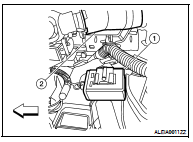
REMOVAL
1. Remove instrument lower cover (LH). Refer to IP-11, "Exploded View".
2. Locate tire pressure receiver (1) to the right of the steering column
(2) and disconnect tire pressure receiver electrical connector.
3. Remove tire pressure receiver (1) from bracket using a suitable
tool to release the bracket.
INSTALLATION
Installation is in the reverse order of removal.
Adjustment
WHEEL BALANCE
1. Remove inner and outer balance weights from the wheel.
CAUTION:
• Be careful not to scratch the wheel during removal procedures.
2. Using releasing agent, remove d ...
Other materials: How to park with predicted course
lines
WARNING
If the tires are replaced with different
sized tires, the predicted course lines
may be displayed incorrectly.
On a snow-covered or slippery road,
there may be a difference between
the predicted course line and the actual
course line.
If the battery is disconnected or becomes
disch ...
Wiper and washer switch
Switch operation
WARNING
In freezing temperatures the washer
solution may freeze on the windshield
and obscure your vision which may
lead to an accident. Warm the windshield
with the defroster before you
wash the windshield.
CAUTION
Do not operate the washer continuously
for more than 30 seconds ...
Forward-facing child restraint
installation using the seat belts
WARNING
The three-point seat belt with Automatic
Locking Retractor (ALR) must be
used when installing a child restraint.
Failure to use the ALR mode will result
in the child restraint not being properly
secured. The restraint could tip over or
be loose and cause injury to a child in a
sudden stop o ...


 On-vehicle repair
 Road wheel tire assembly