Nissan Altima (L32) 2007-2012 Service Manual: Antenna AMP
Removal and Installation - Coupe
REMOVAL
1. Remove the rear pillar finisher RH. Refer to INT-20, "Exploded View".
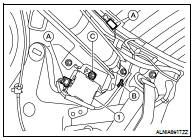
2. Detach the antenna amp harness clip (B), disconnect the
antenna amp connectors (A), remove the antenna amp screw
(C) and remove the antenna amp (1).
NSTALLATION
Installation is in the reverse order of removal.
Removal and Installation - Sedan
REMOVAL
1. Remove the rear pillar finisher RH. Refer to INT-42, "Exploded View".
2. Partially remove the side curtain air bag module RH to gain access to the
antenna amp. Refer to SR-12,
"Removal and Installation".
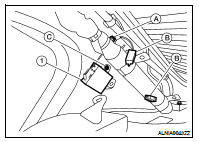
3. Detach the antenna amp harness clip (A), disconnect the
antenna amp connectors (B), remove the antenna amp screw
(C) and remove the antenna amp (1).
INSTALLATION
Installation is in the reverse order of removal.
Location of Antenna
1. In-line connectors M87, M501
2. Audio unit harness
3. Audio unit
4. Satellite antenna
5. Audio antenna feeder
6. Satellite radio antenna feeder
7. Window Antenna
8. An ...
Removal and Installation
REMOVAL
1. Remove the room/map lamp assembly. Refer to INL-121, "Removal and
Installation".
2. Detach the microphone connector (A).
3. Remove the map lamp ...
Other materials: Indicators
When a cellular phone is connected
through the Bluetooth wireless connection,
indicators 1 for the phone and text
messaging are displayed on the top of the
screen.
Control buttons
The control buttons for the Bluetooth
Hands-Free Phone System are located on
the steering wheel.
VOICE COMMAND BUTTON ...
Steering wheel
WARNING
Do not adjust the steering wheel while
driving. You could lose control of your
vehicle and cause an accident.
Do not adjust the steering wheel any
closer to you than is necessary for
proper steering operation and comfort.
The driver's air bag inflates with
great force. If you are un ...
Tire Pressure Monitoring System
(TPMS)
Each tire, including the spare (if provided),
should be checked monthly when cold and
inflated to the inflation pressure recommended
by the vehicle manufacturer on
the vehicle placard or tire inflation pressure
label. (If your vehicle has tires of a different
size than the size indicated on the vehi ...

 Audio antenna (sedan)
 Microphone