Nissan Altima (L32) 2007-2012 Service Manual: Blower unit
Removal and Installation
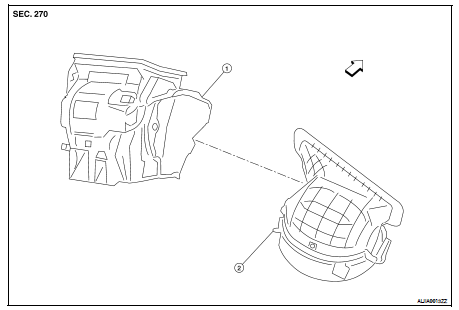
COMPONENTS
1. Heater and cooling unit
2. Blower unit
REMOVAL
1. Remove the heater and cooling unit assembly. Refer to VTL-12, "Removal and
Installation".
2. Disconnect the blower motor connector.
3. Remove the screws from the blower unit, then remove the blower unit.
INSTALLATION
Installation is in the reverse order of removal.
Removal and Installation
COMPONENTS
1. Steering member
2. Heater and cooling unit
3. Blower unit
REMOVAL
1. Discharge the refrigerant from the A/C system. Refer to HA-24, "HFC-134a
(R- ...
Removal and Installation
REMOVAL
1. Remove the glove box. Refer to IP-12, "Removal and Installation".
2. Disconnect the blower motor connector (1).
3. Remove the three blower motor ...
Other materials: Fuel gauge
The gauge indicates the approximate fuel
level in the tank.
The gauge may move slightly during braking,
turning, acceleration, or going up or
down hills.
The gauge needle returns to 0 (Empty) after
the ignition switch is placed in the OFF
position.
The low fuel warning message shows in
the vehic ...
How to use the vehicle information
display
The vehicle information display can be
changed using the ,
, and OK buttons located on the
steering
wheel.
- Use these buttons
to navigate the vehicle information
display.
OK - Change or select an item in the
vehicle information display.
- Returns to the previous
menu.
The OK, and
butto ...
Outside mirrors
The outside mirror remote control only operates
when the ignition switch is placed in
the ON position.
Move the small switch 1 to select the right
or left mirror. Adjust each mirror to the desired
position using the large switch 2.
Move the small switch 1 to the center
(neutral) position to preve ...

 Front
Front Heater & cooling unit assembly
 Blower motor