Nissan Altima (L33) 2013-2018 Owners Manual: Fog lights (if so equipped)
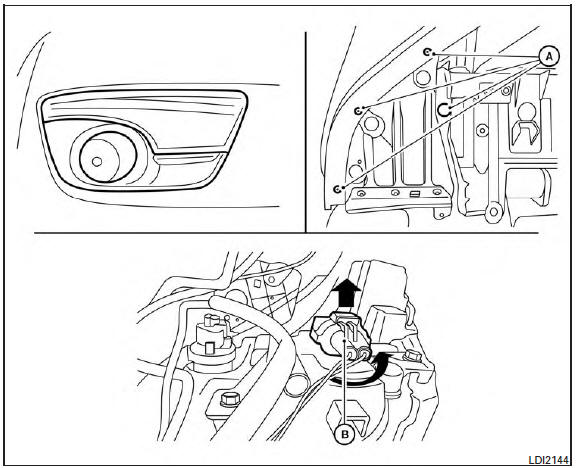
1. Disconnect the negative battery cable.
2. Remove the fasteners A ; carefully pull back
the front fender protector .
3. Rotate the bulb B counterclockwise and
pull out to remove.
Reverse steps to install.
Replacing the xenon headlight bulb (if
so equipped)
WARNING
HIGH VOLTAGE
When xenon headlights are on, they produce
a high voltage. To prevent an electric
shock, never attempt to modify or disas ...
1. Disconnect the negative battery cable.
2. Remove the fasteners A ; carefully pull back
the front fender protector.
3. Rotate the bulb B counterclockwise and
pull out to remove. ...
Other materials: Controls
Fan speed control dial
The fan speed control dial turns
the
fan on and off and controls fan speed.
Air flow control buttons
The air flow control buttons allow you to
select the air flow outlets.
- Air flows from center and side
vents.
- Air flows from center and side
vents and foot outlets.
- Air ...
Precautions on cruise control
RES+ switch
CANCEL switch
SET- switch
Cruise control switch
If the cruise control system malfunctions,
it cancels automatically. The
indicator in the instrument panel
then blinks to warn the driver.
If the indicator blinks,
turn the
cruise control switch off and have the
system ch ...
Air conditioner operation
Start the engine, turn thefan
speed
control dial to the desired position, and
press thebutton to activate the air
conditioner. When the air conditioner is on,
cooling and dehumidifying functions are
added to the heater operation.
The air conditioner cooling function operates
only when the engine i ...

 Headlights
 Park/turn signal lights