Nissan Altima (L32) 2007-2012 Service Manual: Illumination
Removal and Installation
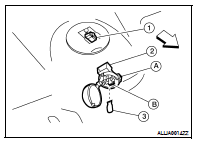
TRUNK ROOM LAMP
Removal
1. Disconnect the negative battery terminal.
2. Release the tab (A), then swing open the lens.
3. Remove the bulb (3).
4. Release the tab (B), then pull trunk room lamp (2) away from
body opening.
5. Disconnect the connector (1) and remove trunk room lamp.
Installation
Installation is in the reverse order of removal.
Bulb Replacement
1. Disconnect the negative battery terminal.
2. Release the tab (A), then swing open the lens.
3. Pull bulb (3) straight out to remove.
Removal and Installation
FRONT ROOM/MAP LAMP
NOTE:
For non-sunroof equipped vehicles, the front room/map lamp assembly is an
integral part of the headinlining
and repaired only as an assembly. R ...
Bulb Specifications
* Always check with the Parts Department for the latest parts information. ...
Other materials: Heater and air conditioner (automatic)
(if so equipped)
AUTO (automatic) climate control button
/ temperature control dial (drivers
side)
Display screen
Heated seat switches
SYNC button / temperature control dial
(passenger’s side)
A/C (air conditioner) button
Air recirculation button
Air flow control button
Fan speed control buttons
Hea ...
Rear-facing child restraint installation
using LATCH
For additional information, see all Warnings
and Cautions in the "Child safety"
and "Child restraints" before installing
a child restraint.
Do not use the lower anchors if the combined
weight of the child and the child restraint
exceeds 65 lbs. (29.5 kg). If the combined
weight of the child and the ...
LDW system limitations
WARNING
Listed below are the system limitations
for the LDW system. Failure to follow
the warnings and instructions for
proper use of the LDW system could result
in serious injury or death.
The system will not operate at
speeds below approximately 37 mph
(60 km/h) or if it cannot detect lane
ma ...



 Interior room lamp
 Service data and specifications
(SDS)
Service data and specifications
(SDS)