Nissan Altima (L32) 2007-2012 Service Manual: License plate lamp
Bulb Replacement
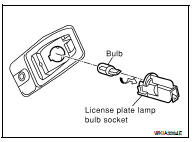
REMOVAL
1. Position trunk lid finisher aside.
2. Turn license plate lamp bulb socket counterclockwise to unlock
and remove.
3. Pull license plate lamp bulb to remove from socket.
INSTALLATION
Installation is in the reverse order of removal.
Removal and Installation
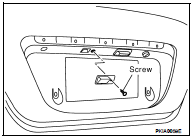
REMOVAL
1. Remove the license lamp finisher. Refer to EXT-23, "Removal and
Installation".
2. Disconnect the license plate lamp connector.
3. Remove the license plate lamp screw and remove the license
plate lamp.
INSTALLATION
Installation is in the reverse order of removal.
Bulb Replacement
Removal
1. Remove the rear combination lamp. Refer to EXL-260, "Removal and
Installation".
2. Turn back-up lamp bulb socket counterclockwise to unlock and remove.
...
Bulb Replacement
Removal
1. Remove the rear combination lamp. Refer to EXL-260, "Removal and
Installation".
2. Turn the rear turn signal lamp bulb socket counterclockwise and remove ...
Other materials: Emergency call (SOS) button (if so equipped)
Emergency support
NissanConnect Services provide various
services to support dealing with emergencies
of the subscribed vehicle and the
driver.
For example, in case of an illness or serious
injury, you can seek support by pressing
the in-vehicle Emergency Call (SOS) button
and connecting to the Nis ...
Indicators
When a cellular phone is connected
through the Bluetooth wireless connection,
indicators 1 for the phone and text
messaging are displayed on the top of the
screen.
Control buttons
The control buttons for the Bluetooth
Hands-Free Phone System are located on
the steering wheel.
VOICE COMMAND BUTTON ...
System maintenance
The two radar sensors 1 for the BSW and
RCTA systems are located near the rear
bumper. Always keep the area near the radar
sensors clean.
The radar sensors may be blocked by temporary
ambient conditions such as splashing
water, mist or fog.
The blocked condition may also be caused
by objects such ...

 Back-up lamp
 Rear combination lamp